Solved

ServiceNow → SQL Sync: Deletes Not Always Detected on Small, Stable Table

  • March 23, 2026
  • 2 replies
  • 50 views

Forum|alt.badge.img

We are experiencing inconsistent delete replication behavior when syncing a very small and stable ServiceNow table (≈10 rows) into SQL Server using CData Sync v26.

Despite following all recommended configurations and upgrading both Sync and the ServiceNow driver, record deletions in ServiceNow are occasionally not detected by CData Sync, resulting in extra rows remaining in the SQL destination.

This has caused incorrect data to appear in executive-level dashboards, impacting trust in reporting.


Observed Behavior

  • Records are deleted in ServiceNow
  • No incremental sync runs successfully with no errors
  • The deleted records remain in SQL Server
  • Dashboard shows more rows than exist in ServiceNow
  • Manual SQL cleanup is required to restore accuracy

Example:

  • Source (ServiceNow): 8 rows
  • Target (SQL): 10 rows
  • The extra 2 records no longer exist in ServiceNow

Expected Behavior

  • Deleted records in ServiceNow should be reliably removed in SQL
  • Sync behavior should be consistent regardless of table size

What We Have Already Done

✔ Upgraded to the latest CData Sync v26 build
✔ Upgraded to the latest ServiceNow connector version
✔ Verified schema stability (no column or structure changes)
✔ Tested multiple GetColumnsMetadata settings (OnUse)
✔ Reviewed replication logs (no delete-related errors reported)
✔ We are not using incremental replication because it is a small table
✔ Confirmed issue occurs even on a small table (~10 rows)

Questions for the Community / CData Team

  1. Are there known limitations with delete detection in the ServiceNow connector?
  2. Does CData Sync rely on:
    • sys_updated_on
    • soft-delete behavior
    • tombstone records
    • or another ServiceNow mechanism for deletes?
  3. Are there additional settings required to reliably detect deletions?
  4. Is this a known issue that requires an engineering fix?
  5. What is the recommended and supported way to guarantee delete consistency?
Best answer by Luçjano Capo

Hi ​@marodsal,

Thank you for reaching out.

I’d also like to add, alongside ​@Prateek Jain, that to the best of my knowledge, all ServiceNow tables support delete tracking.

Please find my responses below:

  1. Are there known limitations with delete detection in the ServiceNow connector?

No, we do not impose any limitations in terms of your use case. You should be able to fetch the deleted records correctly.

  1. Does CData Sync rely on:
    • sys_updated_on
    • soft-delete behavior
    • tombstone records
    • or another ServiceNow mechanism for deletes?

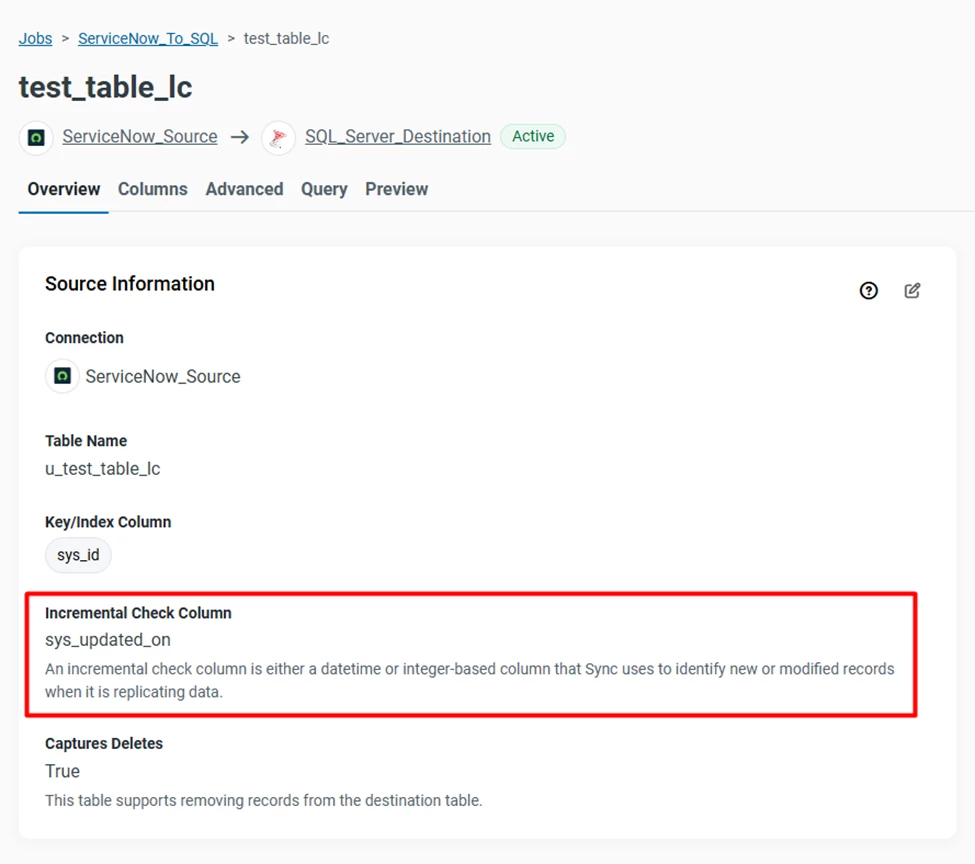
CData Sync uses the sys_updated_on column as the incremental check column. This allows us to track inserts, updates, and deletes by storing the timestamp of the last successful run and using it to fetch only the latest changes.

Per each ServiceNow table, including custom ones, there are six fields which are created automatically; these fields/columns are: Created, Created by, Sys ID, Updated, Updated by, and Updates. (BasicoServiceNowLearning | Tables in ServiceNow)

This ensures that sys_updated_on is always available for incremental tracking.

Incremental Check Column

For delete detection specifically, we query the sys_audit_delete table via the ServiceNow REST API, which records deleted entries.

Here’s how it works in practice:

  • Initial run (full load):
    A query retrieves all records from the source table:
https://ven06096.service-now.com/api/now/v1/table/u_test_table_lc?sysparm_query=ORDERBYsys_id&sysparm_limit=5000&sysparm_display_value=false

Subsequent incremental runs:

  • First, deleted records are retrieved from sys_audit_delete within the relevant time window:
https://ven06096.service-now.com/api/now/v1/table/sys_audit_delete?sysparm_query=tablename=u_test_table_lc^sys_updated_on>2026-03-25+09:58:13^sys_updated_on<=2026-03-25+10:01:08&sysparm_limit=5000
  • Then, inserted and updated records are fetched from the source table using the same time range:
https://ven06096.service-now.com/api/now/v1/table/u_test_table_lc?sysparm_query=sys_updated_on>2026-03-25+09:58:13^sys_updated_on<=2026-03-25+10:01:08^ORDERBYsys_id&sysparm_limit=5000&sysparm_display_value=false

Soft Deletes and Tombstones

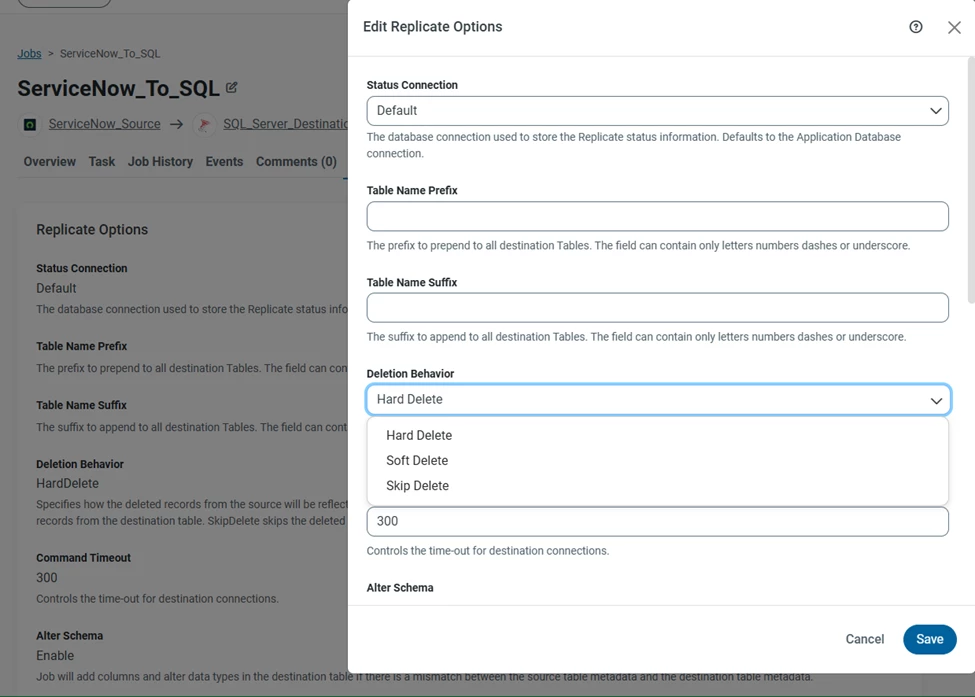
We also support configurable deletion behavior:

Deletion Behavior
  • Hard Delete (default): Removes deleted records from the destination
  • Soft Delete: Retains records but marks them as deleted (useful for tombstone scenarios)
  • Skip Delete: Ignores deletions entirely

If you need tombstone-style tracking, Soft Delete is the recommended option.

  1. Are there additional settings required to reliably detect deletions?

No additional configuration is required, just ensure that Deletion Behavior is not set to Skip Delete.

  1. ​What is the recommended and supported way to guarantee delete consistency?
There are two ways you can follow here. Keep using the incremental replication, or if you want to do an initial load every run, make sure to enable Drop Table in the Advanced section:

Drop Table

This option allows the job to drop the existing destination table before fetching the new results, which will allow you to correctly fetch and save only the data present in the source.

You mentioned that you’re not using incremental replication because the table is small. Could you elaborate on your setup? Specifically:

  • Is the incremental check column missing or not configurable?
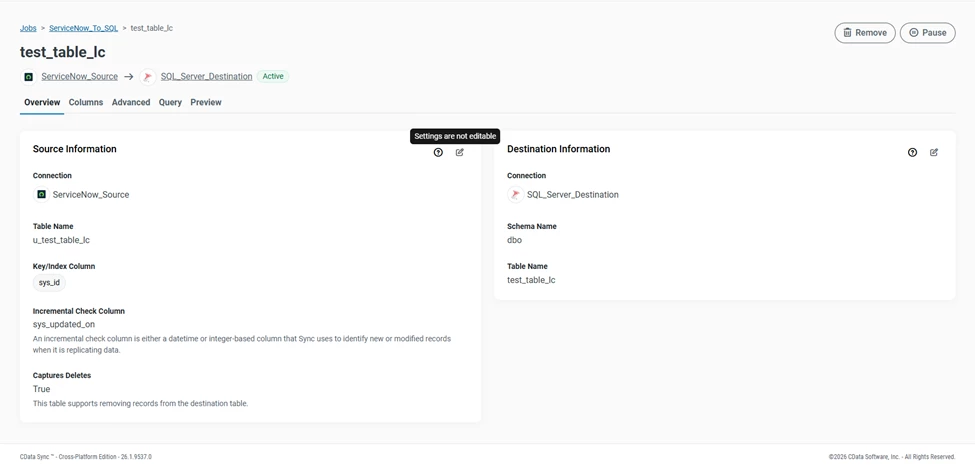
  • Is the Overview section of the task editable?
Task Overview
  1. Is this a known issue that requires an engineering fix?

No, this is not a known issue. However, if you continue to experience problems, please open a support ticket at [email protected] so we can investigate further and provide a tailored solution.

Looking forward to your reply.

This topic has been closed for replies.

2 replies

Forum|alt.badge.img

Hello Marodsal, 

Thanks for reaching out to CData Community Channel.

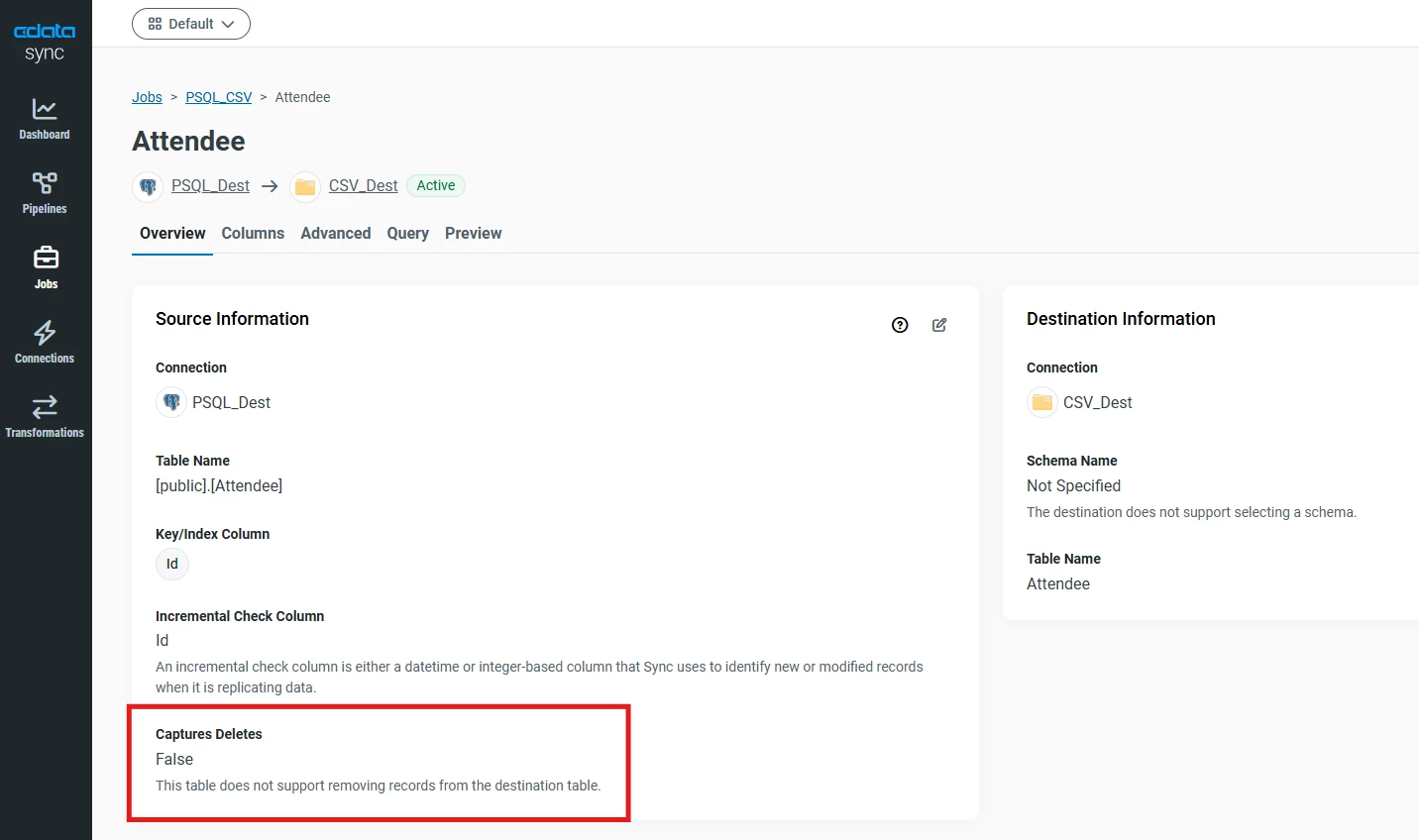
Regarding your issue, the deletion behavior depends on the getDelete() function whether it is being supported by the Service Now API or not. To confirm this, you can navigate to Jobs » Tasks » Open the Table » Check for Capture Delete under Overview of the Tasks.

Please find the screenshot for your reference:


If it is shown as False then it means that the API does not supports the deletion behavior so no deletion behavior (Hard, Soft and Skip) will work and if it is shown as True then it means that API supports it and all the deletion behavior will work.

For more assistance, you can contact us at [email protected] so that we can investigate this issue further and look for some workarounds.


Luçjano Capo
Forum|alt.badge.img
  • Employee
  • Answer
  • March 25, 2026

Hi ​@marodsal,

Thank you for reaching out.

I’d also like to add, alongside ​@Prateek Jain, that to the best of my knowledge, all ServiceNow tables support delete tracking.

Please find my responses below:

  1. Are there known limitations with delete detection in the ServiceNow connector?

No, we do not impose any limitations in terms of your use case. You should be able to fetch the deleted records correctly.

  1. Does CData Sync rely on:
    • sys_updated_on
    • soft-delete behavior
    • tombstone records
    • or another ServiceNow mechanism for deletes?

CData Sync uses the sys_updated_on column as the incremental check column. This allows us to track inserts, updates, and deletes by storing the timestamp of the last successful run and using it to fetch only the latest changes.

Per each ServiceNow table, including custom ones, there are six fields which are created automatically; these fields/columns are: Created, Created by, Sys ID, Updated, Updated by, and Updates. (BasicoServiceNowLearning | Tables in ServiceNow)

This ensures that sys_updated_on is always available for incremental tracking.

Incremental Check Column

For delete detection specifically, we query the sys_audit_delete table via the ServiceNow REST API, which records deleted entries.

Here’s how it works in practice:

  • Initial run (full load):
    A query retrieves all records from the source table:
https://ven06096.service-now.com/api/now/v1/table/u_test_table_lc?sysparm_query=ORDERBYsys_id&sysparm_limit=5000&sysparm_display_value=false

Subsequent incremental runs:

  • First, deleted records are retrieved from sys_audit_delete within the relevant time window:
https://ven06096.service-now.com/api/now/v1/table/sys_audit_delete?sysparm_query=tablename=u_test_table_lc^sys_updated_on>2026-03-25+09:58:13^sys_updated_on<=2026-03-25+10:01:08&sysparm_limit=5000
  • Then, inserted and updated records are fetched from the source table using the same time range:
https://ven06096.service-now.com/api/now/v1/table/u_test_table_lc?sysparm_query=sys_updated_on>2026-03-25+09:58:13^sys_updated_on<=2026-03-25+10:01:08^ORDERBYsys_id&sysparm_limit=5000&sysparm_display_value=false

Soft Deletes and Tombstones

We also support configurable deletion behavior:

Deletion Behavior
  • Hard Delete (default): Removes deleted records from the destination
  • Soft Delete: Retains records but marks them as deleted (useful for tombstone scenarios)
  • Skip Delete: Ignores deletions entirely

If you need tombstone-style tracking, Soft Delete is the recommended option.

  1. Are there additional settings required to reliably detect deletions?

No additional configuration is required, just ensure that Deletion Behavior is not set to Skip Delete.

  1. ​What is the recommended and supported way to guarantee delete consistency?
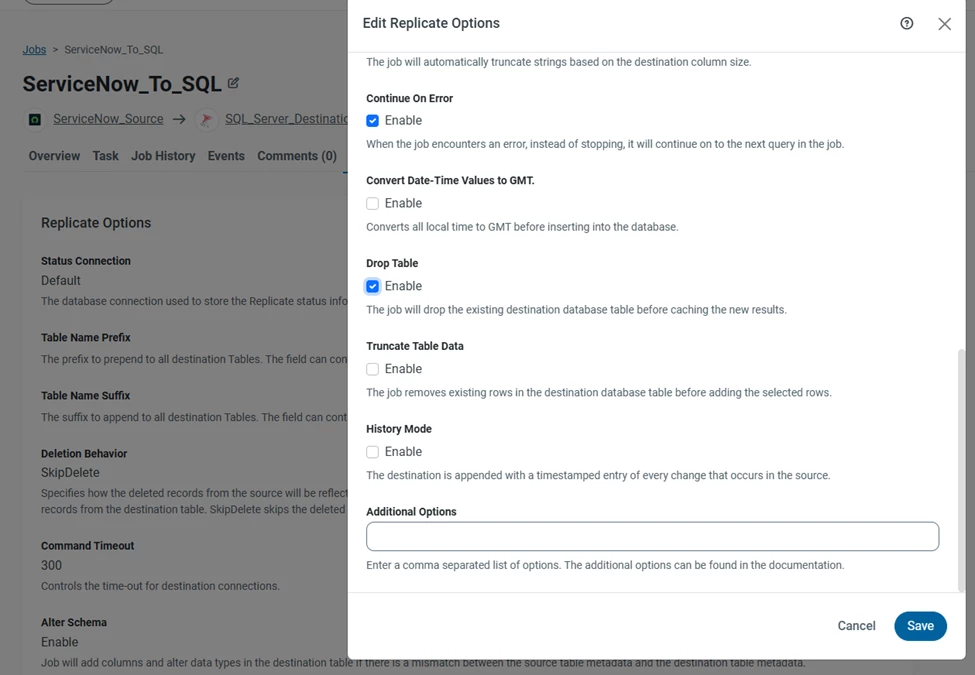
There are two ways you can follow here. Keep using the incremental replication, or if you want to do an initial load every run, make sure to enable Drop Table in the Advanced section:

Drop Table

This option allows the job to drop the existing destination table before fetching the new results, which will allow you to correctly fetch and save only the data present in the source.

You mentioned that you’re not using incremental replication because the table is small. Could you elaborate on your setup? Specifically:

  • Is the incremental check column missing or not configurable?
  • Is the Overview section of the task editable?
Task Overview
  1. Is this a known issue that requires an engineering fix?

No, this is not a known issue. However, if you continue to experience problems, please open a support ticket at [email protected] so we can investigate further and provide a tailored solution.

Looking forward to your reply.