CData SQL Gateway runs as a background process, as to ensure that the connection between the ODBC driver and your instance of SQL Server isn’t closed prematurely. When you exit out of the window of SQL Gateway, it closes the window while still running in the background.
If you’re unable to open it again, then it is likely already open. To open a background process, you’ll need to access it from the system tray. It should look like this:
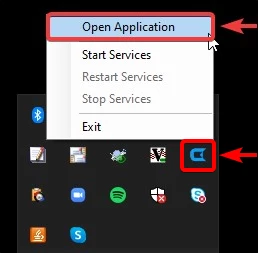
If you need to shut down SQL Gateway entirely, you can right-click and select Exit on the icon in the system tray.
