This error occurs when our driver’s file is missing from the References. In this example, I will be using Survey Monkey provider. To be able to use our ADO .NET for SurveyMonkey in Visual Studio follow these steps:
-
Open Visual Studio
-
Create a Console App (.NET Framework) project in C#
-
In the right panel (Solution Explorer) right-click on References
-
Add Reference…
-
Browse…
-
Find your System.Data.CData.SurveyMonkey.dll file which is by default located here: C:\Program Files\CData\CData ADO.NET Provider for SurveyMonkey 2022\lib
Now you can refer to our documentation online to be able to connect from code.
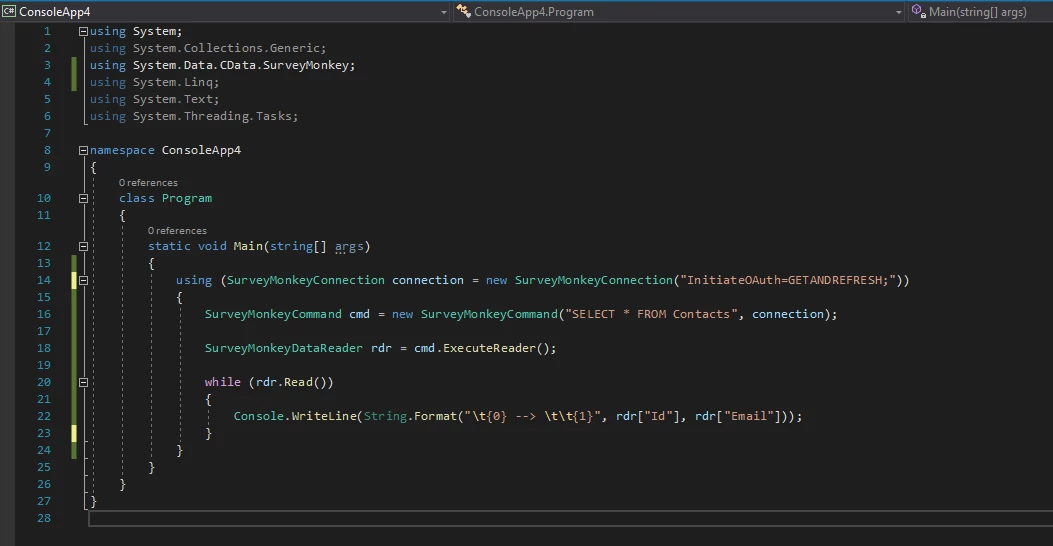
Here is an example of querying data from the Contacts table. Please keep in mind to include the SurveyMonkey library -> using System.Data.CData.SurveyMonkey.