

While CData Sync has built-in scheduling for repeating jobs at specific intervals, you may want to trigger some replication tasks only after others have completed. With CData Sync's event API, you can do this easily.
- You'll first need to generate a Sync Authtoken. In CData Sync, navigate to Settings > Users > Add User. Create a user with at least the Job Operator role and make sure the "API Access" checkbox is enabled.
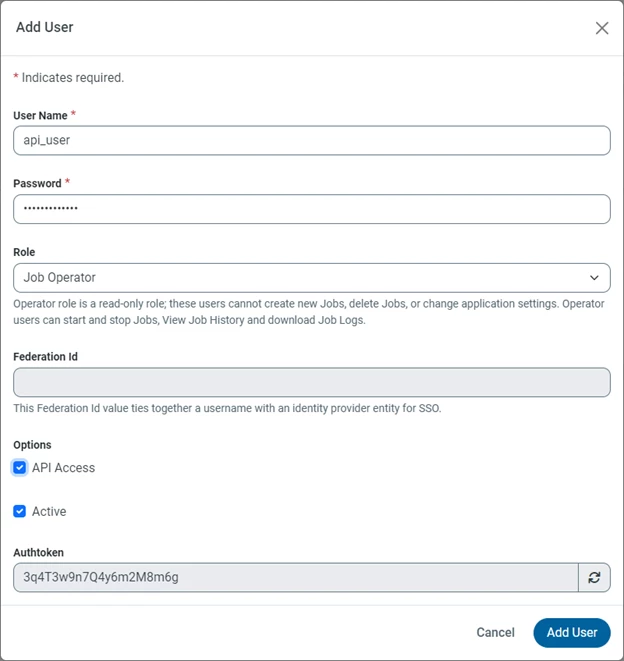
- Make note of the Authtoken, saving it in a secure location for future use.
- Navigate to the first Job you want to run and click the Events tab.
- Under Post-Job Events, paste the following scripting snippet on line 12. Replace "JobName" with the name of the job you wish to run next. Replace "123456789" with the Authtoken from Step 2.
<!-- Start Executing different Job -->
<api:set attr="job.JobName" value="Job2"/>
<api:set attr="job.ExecutionType" value="Run"/>
<!--Setting WaitForResults to true will wait for Job to complete -->
<api:set attr="job.WaitForResults" value="true"/>
<api:call op="~/api.rsc/executeJob" httpmethod="post" authtoken="123456789" in="job"/>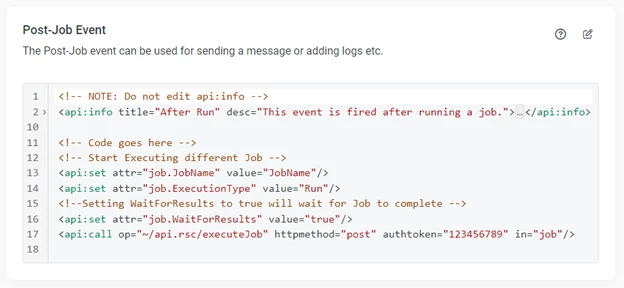
- Repeat step 4 for the other jobs you want to run sequentially, using the same Authtoken for each job.
Free trial & more information
Visit our CData Sync page to read more information about CData Sync. To try out scheduling jobs yourself, download a free 30-day trial! As always, our world-class Support Team is ready to answer any questions you may have.
