
Solved

Copying XML input into a Message header and passing through the XML input to the output

  • June 4, 2024
  • 2 replies
  • 118 views

Forum|alt.badge.img+1

Hi


I need to pass some XML through an XMLMap connector, but I also want to preserve the original XML input, for later use.

My thought was to do this in a script before it hits the XMLMap
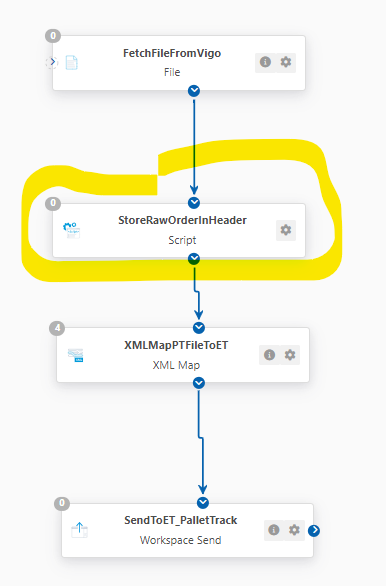
 

But I don’t know how to 

  1. copy the Script connector input, straight out to the output
  2. copy the Script connector input into a message header

Thoughts
Best answer by James B

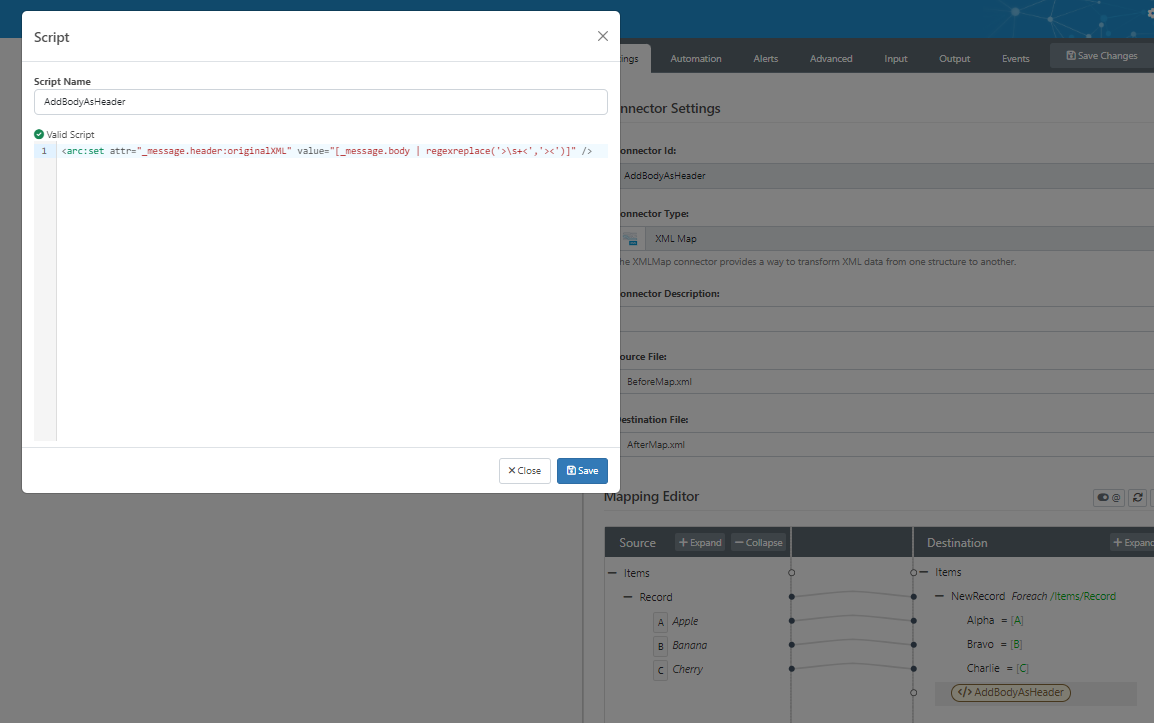
I see what you mean now. You could also do this directly in the XML Map with a Script step inside the XML Map:


The code here is:

<arc:set attr="_message.header:originalXML" value="[_message.body | regexreplace('>\s+<','><')]" />

Note that this regexreplace is meant to minify the XML if it’s not already minified (headers can’t be multiline values - you can also base64encode the content if you want to preserve whitespace), and that the body of the message isn’t fully loaded until after the first Foreach loop

This topic has been closed for replies.

2 replies

Forum|alt.badge.img+1

I think I’ve worked it out:


<arc:set attr="output.header:raworiginalorder" value="[_message.body]" />
<arc:set attr="output.data" value="[_message.body]" />

<arc:set attr="output.filename" value="[FileName]" />
<arc:push item="output" />


James B
Forum|alt.badge.img
  • Employee
  • Answer
  • June 4, 2024

I see what you mean now. You could also do this directly in the XML Map with a Script step inside the XML Map:


The code here is:

<arc:set attr="_message.header:originalXML" value="[_message.body | regexreplace('>\s+<','><')]" />

Note that this regexreplace is meant to minify the XML if it’s not already minified (headers can’t be multiline values - you can also base64encode the content if you want to preserve whitespace), and that the body of the message isn’t fully loaded until after the first Foreach loop