
Solved

Export Message/Transaction logs?

  • January 25, 2024
  • 2 replies
  • 57 views

Forum|alt.badge.img+1

Is there a way to export the message or transaction logs from /logs.rst#messages or logs.rst#transactions ?

I want to analyse traffic so I can determine a maintenance window for the best time do upgrade cData Arc


I’m sure with a bit of AI magic cData Arc could even suggest one 😃
 

Best answer by James B

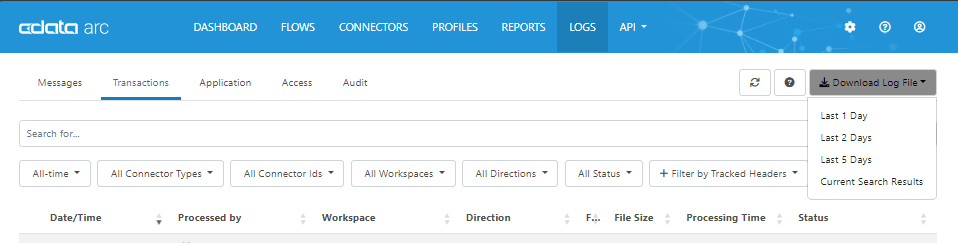
The ability to export the entries from the Application, Transaction, or Access logs is a feature of the administration console. In the 2023 release of CData Arc, you’ll find this in the Logs tab, and in earlier releases, the logs are downloadable from the Status menu:


Is this what you’re looking for? If you’re looking for something more programmatic, you can access the Logs resource in the Admin API:


https://cdn.cdata.com/help/AZJ/mft/Admin-API-Resources.html


But it looks to me like you are looking for a straightforward approach.

This topic has been closed for replies.

2 replies

James B
Forum|alt.badge.img
  • Employee
  • Answer
  • January 26, 2024

The ability to export the entries from the Application, Transaction, or Access logs is a feature of the administration console. In the 2023 release of CData Arc, you’ll find this in the Logs tab, and in earlier releases, the logs are downloadable from the Status menu:


Is this what you’re looking for? If you’re looking for something more programmatic, you can access the Logs resource in the Admin API:


https://cdn.cdata.com/help/AZJ/mft/Admin-API-Resources.html


But it looks to me like you are looking for a straightforward approach.


Forum|alt.badge.img+1

Yep, exporting is fine.


I’ve found the option now. It doesn’t show on the Messages tab.