In my main application, I started using Arc to send automated emails by writing a simple XML file to a folder that Arc monitors. I have a case where I am mapping the XML to an Email Send connector (using template mode) and I need to attach a PDF to the message (which was already uploaded to the server).
I have the path to the file saved in SQL and I can add the path to my XML file. My question is, how can I configure the Email Send connector to “attached” the file (assuming the path is a node in my XML)? Right now, all I can do is reformat the path into an http link and add it to the body.
If I understand correctly, you want to send attachments along with your email body. In the advanced section of our configuration, there’s an option that allows you to attach files.
If I use Attachment mode, Arc will attach the above XML file to the email.
I’m currently running 2023 - 23.3.8725.0 and don’t see the above checkbox so I assume I will need to use the snip for “Other Settings”.
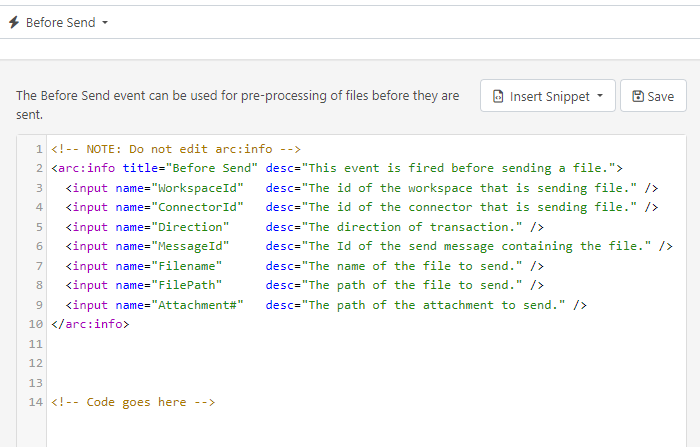
My question is: where does the ArcScript go to locate and attach the file in [xpath(File)] (I know where logical path to the file location)? Would I use the Before Send event?
If you are using an earlier release, you will need to configure the settings under other settings.
In attachment mode, you can write the script within the settings tab of the connector, and the file passed through the input will be sent as an attachment.
Here is an example: I am sending the filename as the body of the email along with the attachment.
The EmailSend connector wouldn’t be the right one for this task as you present it now - you can evaluate the message as a template using the template mode, and attach the message file (in this case, the xml file), but you cannot dynamically evaluate additional attachments to the EmailSend connector.
If you had a flow that picked up and processed the PDF file itself, and sent that to the EmailSend connector in Attachment mode, that would send your PDF - and if you included all of the other metadata as headers on the messages in Arc, reversing your message structure:
Then you could send your PDF in attachment mode, and use the allowarcscriptinattachmentmode as Lohith mentions to dynamically render those elements in the headers in the body:
If you do that, you could use a script to parse your XML and output the PDF referenced in it with additional headers. Assuming that you have these PDF’s in a static folder, something like this would work:
This website stores cookies on your computer. These cookies are used to collect information about how you interact with our website and allow us to remember you. We use this information in order to improve and customize your browsing experience and for analytics and metrics about our visitors both on this website and other media.
Review section III of our Privacy Policy for more information on cookies.
To opt out of “sale” or “sharing” of non-cookie data, visit our Privacy Rights Request Form.