We are trying the map multiple fields in a XML (EDI) into one field in another XML in a XML Map connector. We use the implode formatter for this. But it isn’t working, we only get the first item. But we want all the NTE02 fields joined with a newline as separator.
This is the script we use:
[xpath(“FunctionalGroup/TransactionSet/TX-00401-940/NTE/NTE02”) | implode]
Source XML:
<FunctionalGroup>
<TransactionSet>
<TX-00401-940 type=“TransactionSet”>
<NTE type=“Segment”>
<!--Note
Reference Code-->
<NTE01><!--Warehouse
Instruction-->WHI</NTE01>
<!--Description-->
<NTE02>PALLETS COVERED WITH STRETCH HOOD</NTE02>
</NTE>
<!--Note/Special
Instruction-->
<NTE type=“Segment”>
<!--Note
Reference Code-->
<NTE01><!--Warehouse
Instruction-->WHI</NTE01>
<!--Description-->
<NTE02>ONLY CP7 PALLETS</NTE02>
</NTE>
<!--Note/Special
Instruction-->
<NTE type=“Segment”>
<!--Note
Reference Code-->
<NTE01><!--Warehouse
Instruction-->WHI</NTE01>
<!--Description-->
<NTE02>PLEASE LOAD MAX 2 BATCHES</NTE02>
</NTE>
</TX-00401-940>
</TransactionSet>
</FunctionalGroup>
Destination XML:
<Remarks>PALLETS COVERED WITH STRETCH HOOD</Remarks>
Hi Gheys,
This is the script we use:
[xpath(“FunctionalGroup/TransactionSet/TX-00401-940/NTE/NTE02”) | implode]
Your requirement is to store each NTE02 field value for each mapping iterations within the XML map with comma ”,” separated. To do this you will require to create an array variable, let me explain this step by step.
Below are the samples I’m using your sample as a Source and below one as Destination within the XML map:
Destination xml file:
<Target>
<Remarks>PALLETS COVERED WITH STRETCH HOOD</Remarks>
</Target>
1. Create a Virtual Loop over the NTE Segment (as you want to loop over all NTE segments for all NTE02 fields) .
2. Add a child Variable and name the variable(I provided NTE02Data# as a variable name) and map the NT02 Field to this Variable.
-
Add Remarks Field as a sibling field to the Virtual loop
-
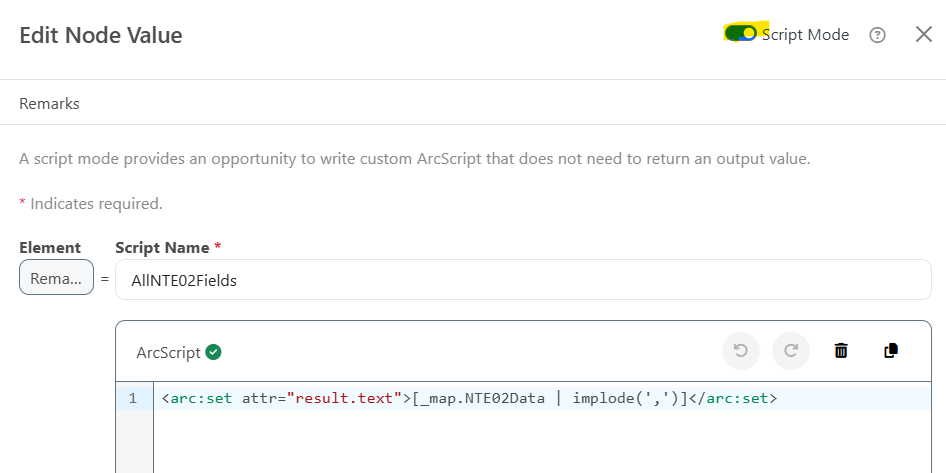
Then open the Expression editor to the Remarks Field and enable the script mode and provide the script below:
<arc:set attr=“result.text”>[_map.NTE02Data | implode(‘,’)]</arc:set>
Example snippet for your reference:
Below is the final map for your reference:
The Results will be like this:
Attached is the XMLMap for your reference:
XMLMap-Implode.zip (3.6 KB)