Solved

Download -> Send Binary File

  • September 18, 2025
  • 6 replies
  • 56 views

Forum|alt.badge.img

I am trying to use httpGet to retrieve binary files, then push them through via a Script connector:
 

<arc:set item="httpGetInput" attr="url" value="[params.pdfUrl]" />
<arc:call op="httpGet" in="httpGetInput" out="response">
<arc:set attr="output.data" value="[response.http:content]" />
<arc:set attr="output.filename" value="test.pdf" />
<arc:push item="output" />
</arc:call>

It downloads the file, and sends it through, however the file is garbled, I assuming this is a encoding problem somewhere.

Downloading the files directly from the source URL, the files render fine.

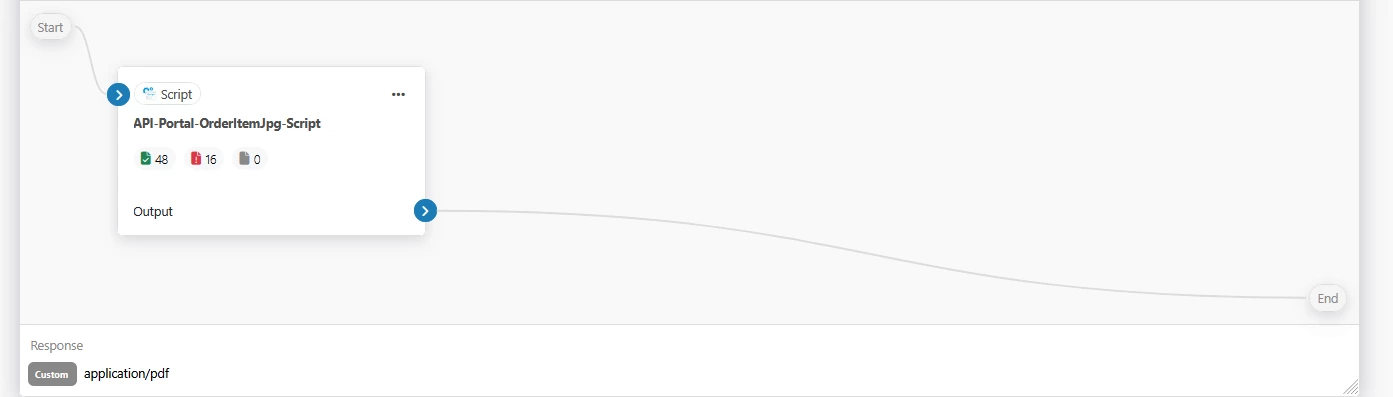
Said connector is inside an API Request, with Response content type set to “application/pdf”:


There must be something I am missing.

 

Best answer by James B

I see; this is part of a Flow API - the Flow API is not designed to return binary file content in the output.


This is something that we are considering in future versions of CData Arc, but if you want to return binary file content, you’re going to need to implement a layer of encoding in the response so that the file is returned in a format that will preserve all of the bytes as a string (Base64 encoding is recommended). 
 

You can either output the Base64 encoded contents directly to the output:


<arc:set attr="params.pdfPath" value="C:\\temp\\Numbers.pdf" />

<arc:set attr="enc.file" value="[params.pdfpath]" />
<arc:set attr="enc.format" value="BASE64" />
<arc:call op="encEncode" item="enc">
<arc:set attr="output.data">[enc.encodeddata]</arc:set>
</arc:call>
<arc:set attr="output.filename" value="response.b64" />

<arc:push item="output" />

Or you can wrap the output in a JSON structure where the filename and content are preserved:

<arc:set attr="params.pdfPath" value="C:\\temp\\Numbers.pdf" />

<arc:set attr="enc.file" value="[params.pdfpath]" />
<arc:set attr="enc.format" value="BASE64" />
<arc:call op="encEncode" item="enc">
<arc:set attr="output.data">{
"Filename": "test.pdf",
"EncodedData": "[enc.encodeddata]"
}</arc:set>
</arc:call>
<arc:set attr="output.filename" value="response.json" />

<arc:push item="output" />


This topic has been closed for replies.

6 replies

James B
Forum|alt.badge.img
  • Employee
  • September 19, 2025

I would recommend the use of the REST connector for this kind of operation, but if you have a need to use ArcScript operations, you’re going to find that the http:content output parameter of the httpGet call is only useful for string data.


If you intend to download a binary file, you will want to set the localfile parameter input to the operation, to instruct the operation to write the contents to file:

https://cdn.cdata.com/help/AZM/mft/op_HTTPGet.html


<arc:set item="httpGetInput" attr="url" value="[params.pdfUrl]" />

<!-- use a path you have access to, and if you expect to call this script in parallel
use a unique name -->
<arc:set item="httpGetInput" attr="localfile" value="/tmp/test.pdf" />
<arc:call op="httpGet" in="httpGetInput" out="response">
<!-- reference the output by filepath for binary content -->
<arc:set attr="output.filepath" value="/tmp/test.pdf" />
<arc:set attr="output.filename" value="test.pdf" />
<arc:push item="output" />
</arc:call>

<!-- clean up after yourself -->
<arc:set attr="del.file" value="/tmp/test.pdf" />
<arc:call op="fileDelete" item="del" />


Forum|alt.badge.img
  • Author
  • Collaborator
  • September 19, 2025

For testing, I’ve reduced this down and eliminated the httpGet call from the script alltogether, this is my entire script:
 

<arc:set attr="params.pdfPath" value="//path/to/good.pdf" />

<arc:set attr="output.filepath" value="[params.pdfPath]" />
<arc:set attr="output.filename" value="test.pdf" />
<arc:push item="output" />

The file is still messed up. The pdf does get downloaded, but its not the correct size (~20k larger) and the content is not right. 

There are no other connectors downstream in my flow.

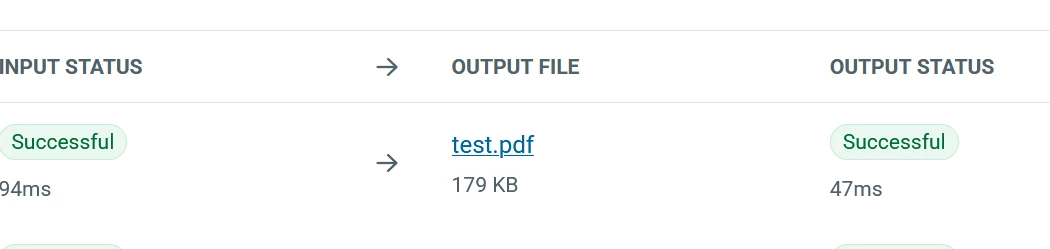
Clicking the output file (and downloading) in the transactions tab, the PDF file is good. So something is happening after my script connector:


James B
Forum|alt.badge.img
  • Employee
  • September 19, 2025

Are you certain the good.pdf being referenced here differs from what is output?


If you are using a Script connector and pushing a binary file to the output, setting the filepath parameter on the item you wish to output is the right approach. Whereas setting the data attribute of the output item will encode the field as a string, setting the filepath parameter simply references the contents of the file, by for byte. 

If you’re still seeing an issue, please open a support request with us at:
 

Technical Support | CData


Include the current version of the script, and if you’re able to share it, include the pdf you are testing as well. 


Forum|alt.badge.img
  • Author
  • Collaborator
  • September 19, 2025

Sorry, not sure if you saw my update to my last comment, clicking the output file in the Script Transactions tab, the PDF is good. I can download from there and it renders as expected and is the correct size. So something is happening after the script connector, but I have nothing there:


Ignore the name of the script. 


James B
Forum|alt.badge.img
  • Employee
  • Answer
  • September 19, 2025

I see; this is part of a Flow API - the Flow API is not designed to return binary file content in the output.


This is something that we are considering in future versions of CData Arc, but if you want to return binary file content, you’re going to need to implement a layer of encoding in the response so that the file is returned in a format that will preserve all of the bytes as a string (Base64 encoding is recommended). 
 

You can either output the Base64 encoded contents directly to the output:


<arc:set attr="params.pdfPath" value="C:\\temp\\Numbers.pdf" />

<arc:set attr="enc.file" value="[params.pdfpath]" />
<arc:set attr="enc.format" value="BASE64" />
<arc:call op="encEncode" item="enc">
<arc:set attr="output.data">[enc.encodeddata]</arc:set>
</arc:call>
<arc:set attr="output.filename" value="response.b64" />

<arc:push item="output" />

Or you can wrap the output in a JSON structure where the filename and content are preserved:

<arc:set attr="params.pdfPath" value="C:\\temp\\Numbers.pdf" />

<arc:set attr="enc.file" value="[params.pdfpath]" />
<arc:set attr="enc.format" value="BASE64" />
<arc:call op="encEncode" item="enc">
<arc:set attr="output.data">{
"Filename": "test.pdf",
"EncodedData": "[enc.encodeddata]"
}</arc:set>
</arc:call>
<arc:set attr="output.filename" value="response.json" />

<arc:push item="output" />


Forum|alt.badge.img
  • Author
  • Collaborator
  • September 19, 2025

Oddly enough, that was my next task, converting the pdf to base64, wanted to make sure I could get the PDF in original format working first. I will try that now. Thanks for your help James.