

Solved

Extracting Multiple Occurrences of a Loop in an EDI File Using Lookaheads in Cdata Arc

  • March 11, 2025
  • 3 replies
  • 114 views

Forum|alt.badge.img

I am working with an incoming EDI file where I use lookaheads to identify the correct loop. In my case, the EDI file contains the Service Level Loop (HL/HL03='SS') appearing twice. While I can successfully extract the first occurrence using the following XPath:

xpath("HLLoop1[HL/HL03='SS']/MSG/MSG01")

I attempted to retrieve the second occurrence using:

xpath("HLLoop1[HL/HL03='SS'][2]/MSG/MSG01")

Although this expression did not return an error, it did not extract the expected data either.


Has anyone encountered a similar issue? What would be the correct XPath expression to extract both occurrences of the Service Level Loop? Any insights or alternative approaches would be greatly appreciated!
Best answer by TR3X

Hi Tarun,

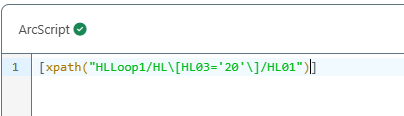
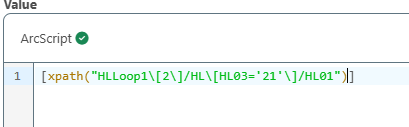
I tested your sample file and created a sample mapping in the XMLMap connector. I was able to successfully configure the lookahead functionality again, using two lookahead expressions for HLLoop1 and HLLoop2. Attached is a screenshot of the expressions.


Since the updated XPath expression did not work as expected on your end, please share the exported configuration of your XMLMap connector. This will allow us to review how the lookahead is implemented and identify the cause of the issue. Additionally, please provide your email address so we can reach out to you directly.

Let me know if you need further assistance.

This topic has been closed for replies.

3 replies

  • Employee
  • March 11, 2025

Hi Tarun,

Thank you for reaching out to us.


I reviewed the XPath syntax you're using, and it looks like the second expression is incorrect, which is why you're not getting the expected data. The issue lies in the placement of the positional index [2].

In XPath, to correctly select the second occurrence of an element that meets a specific condition, the predicate must be applied at the appropriate level.

Instead of:

xpath("HLLoop1[HL/HL03='SS'][2]/MSG/MSG01")

Try using:

xpath("HLLoop1\[2\]/HL\[HL03='SS'\]/MSG/MSG01")

Let me know if you need any further clarification!


Forum|alt.badge.img
  • Author
  • Apprentice
  • March 11, 2025

Here’s a response you can post:


Hi Anant,


Thank you for your response and suggestion! I tried using the updated XPath expression, but unfortunately, it didn’t work as expected. Could you please suggest an alternative approach?


For reference, I am working on an X12 217 document (EDI 278) and here’s a sample of my test data:

ST*278*120143*005010X217~
BHT*0007*11*0*20241206*100239*18~
HL*1**20*1~
NM1*X3*2*Sams Health, Inc*****46*974457758~
HL*2*1*21*1~
NM1*1P*1*Williams*Stephanie*Celeste***XX*974457758~
REF*EI*746374637~
PRV*OR~
HL*3*2*22*1~
NM1*IL*1*Ware*Adam****MI*250839~
REF*SY*746374637~
N3*123 Any Street~
N4*Garland*MA*75042~
DMG*D8*19960714~
HL*4*3*23*1~
NM1*QC*1*Ware*Noah~
REF*SY*746374637~
N3*123 Any Street~
N4*Garland*MA*75042~
DMG*D8*19681201~
HL*5*4*EV*1~
TRN*1*120143*1234567890~
UM*HS*I*3~
HCR*A1~
HI*ABK:M47817*ABF:M2560~
NM1*FA*2*LONE STAR AMBULANCE 1, LLC*****XX*974457758~
REF*EI*746374637~
N3*3201 S AUSTIN AVE STE 335~
N4*George Town*TX*75001~
PER*IC*Chris Smith*FX*222 2222222*TE*111 1111111~
HL*6*5*SS*0~
TRN*1*120143*1234567890~
HCR*A1**10~
DTP*472*RD8*20241205-20241220~
SV1*HC:97110**UN*12~
MSG*Test Auth~
HL*7*5*SS*0~
TRN*1*120143*1234567890~
HCR*A1**10~
DTP*472*RD8*20241205-20241220~
SV1*HC:97530**UN*12~
MSG*Test Auth~
SE*43*120143~


Looking forward to your guidance!


Best,

Tarun


  • Employee
  • Answer
  • March 12, 2025

Hi Tarun,

I tested your sample file and created a sample mapping in the XMLMap connector. I was able to successfully configure the lookahead functionality again, using two lookahead expressions for HLLoop1 and HLLoop2. Attached is a screenshot of the expressions.


Since the updated XPath expression did not work as expected on your end, please share the exported configuration of your XMLMap connector. This will allow us to review how the lookahead is implemented and identify the cause of the issue. Additionally, please provide your email address so we can reach out to you directly.

Let me know if you need further assistance.
