Just discovered CData Connect Spreadsheets when searching for a way to get Google Calendar information into Excel. Looks very good.
However, when test-driving the software, I run into an issue.
I have a primary calendar under my Google Workspace account [removed by moderator] . In addition, I have created multiple secondry calendars for various purposes.
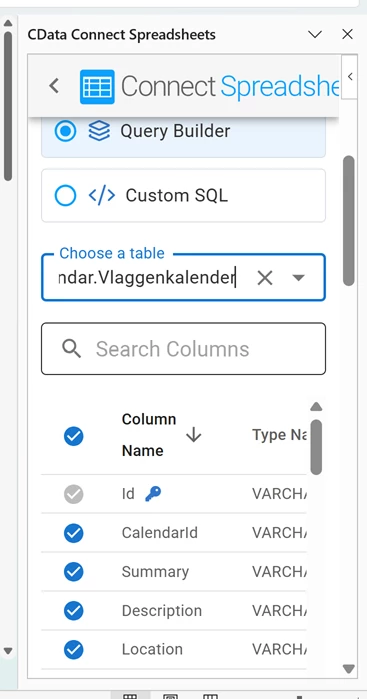
I've successfully connected the addin to my account, including successful authentication. When I start the Import process, I can select the configured connection, and the Table list populates with all available tables, including all calendars. When I select one of the secondary calendars, such as 'Placeholders' or 'Flags', the column list is loaded, the generated query is created, and the Execute/Reset buttons become available (see 2nd screenshot). When I hit Execute, the Excel list is populated with data from the selected calendar. All as expected.
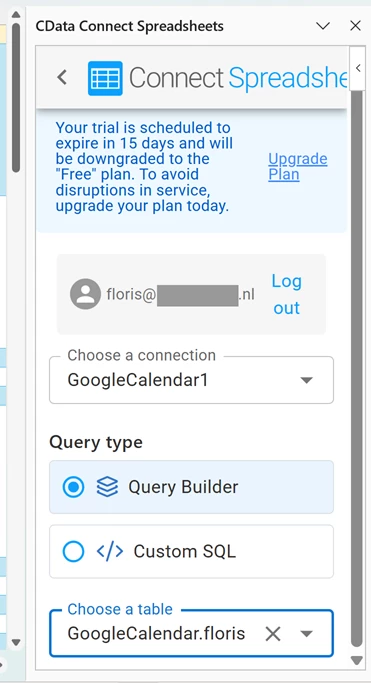
But when I select my primary calendar [removed by moderator] , none of that happens. The CData Connect Spreadsheets panel still ends at the Table dropdown, and there is no way to proceed with data import (see 1st screenshot). Which means that I cannot import data from my primary calendar into Excel. Which is my main use case for the software.
Any idea why the primary calendar cannot be loaded? And how I can fix this?