

Question

My query stops works from 2025/1/6.

  • January 16, 2026
  • 2 replies
  • 41 views

Forum|alt.badge.img

Hi, CData team,  we found that the following query text stops works from 2025/1/26.

SELECT [[char\]] FROM [SQL_KrewTestDB].[krewtestdb].[bug2149] LIMIT 500

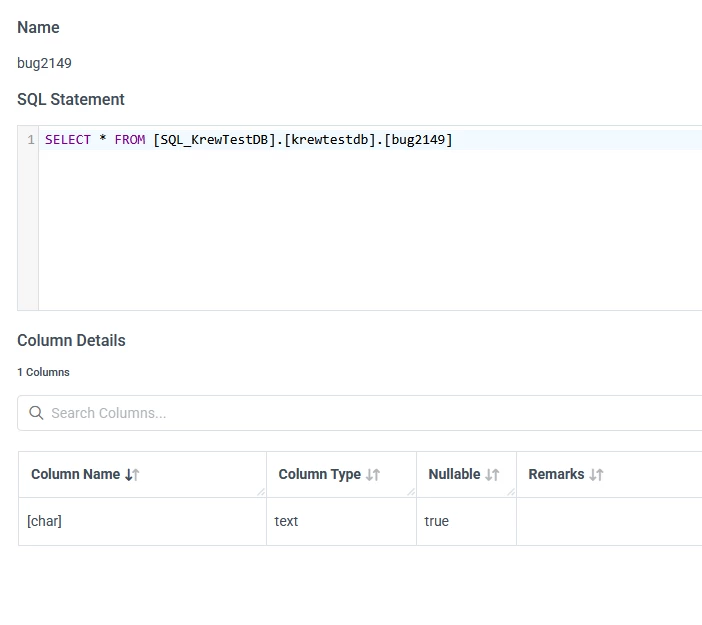
My table as following, the data source is My SQL. You can see that the column name is [char], it has the special char “[”, “]”, before it works well, but from 2025/1/26, it stop working.
 

2 replies

Ethem Q
Forum|alt.badge.img
  • Employee
  • January 19, 2026

Hi ​@daryluo,

What happens if you wrap the name of the column in backticks as in the following example?

SELECT `[char]` FROM FROM [SQL_KrewTestDB].[krewtestdb].[bug2149] LIMIT 500

 Backticks are used as quote identifiers in MySQL, so you might want to give this a try and see if it helps getting around the issue you are facing.

Otherwise, I would suggest you grab a few details like the CData MySQL version in use, and Verbosity=5 logs from the MySQL connection and submit a support ticket  here so that one of our support specialists can further assist you with troubleshooting the issue.


Forum|alt.badge.img
  • Author
  • Apprentice
  • January 20, 2026

Hi, ​@Ethem Q 
We know the workaround, but we don’t know whether it also works well for MS SQL SERVER(Before, we have subscription for MS SQL SERVER, but now we don’t have subscription for MS SQL SERVER).

We should make sure that the query string both works well for MY SQL and MS SQL SERVER.

We use MY SQL 9.4.0, your code works well at MY SQL 9.4.0.
