Question

Error: Could not get the allow dB amp to run remotely registry setting

  • April 22, 2026
  • 1 reply
  • 17 views

I am trying to upgrade from to the latest version 2025. When I start my job, I get the following error message “Could not get the allow dB amp to run remotely registry setting”. It does seem we have this particular registry setting that might be different from others. 
 

1 reply

Ethem Q
Forum|alt.badge.img
  • Employee
  • April 27, 2026

Hi ​@dbaserver 

This is just a warning indicating that the user running the command does not have access to the Registry to read the "allow dbamp to run remotely" Registry setting. If you are not trying to run DBAmp remotely, then this is nothing to worry about.

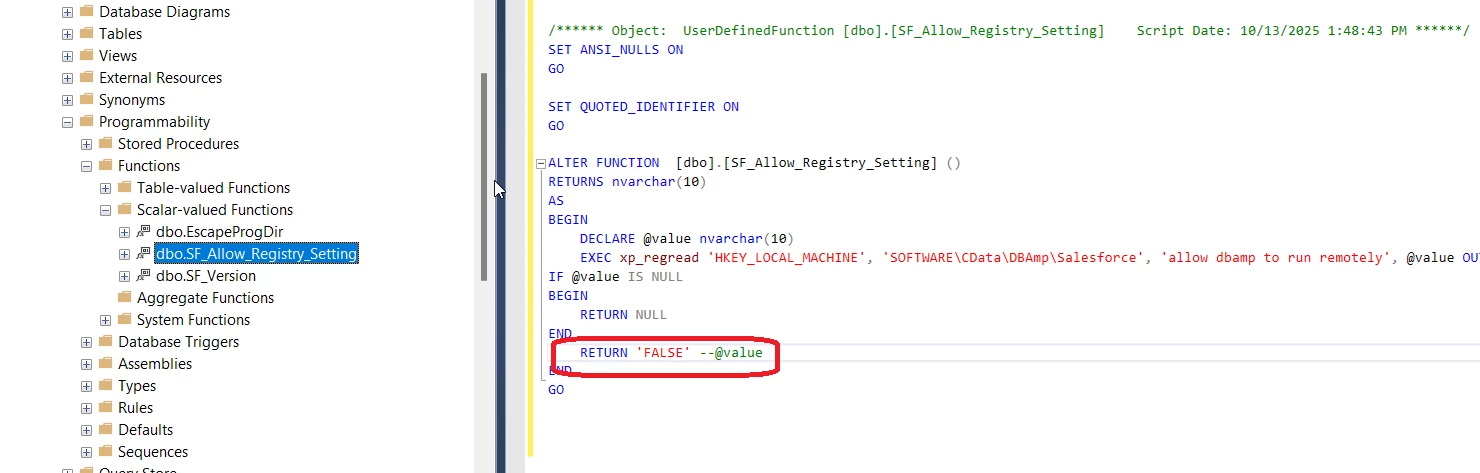
If you would like to stop seeing that warning, you can alter the SF_Allow_Registry_Setting scalar-valued function to always return False. You can find this setting from the Object Explorer in SSMS by expanding Databases > Your Database > Programmability > Functions > Scalar-valued Functions > right-click dbo.SF_Allow_Registry_Setting > Script function as > ALTER To. In that ALTER To script, you should change it to return 'False', and run the script.


If you make this change, I recommend making a note of it in case you ever want to run DBAmp remotely.