
Question

Can not get data in Power BI using SuiteCRM Sys

  • October 8, 2026
  • 2 replies
  • 21 views

Forum|alt.badge.img

I’m using CData SuiteCRM. Previously the connection was established and could bring in data to Power BI, as well as refresh on Power BI service. 

But after setting the following for Caching, the tables cannot be found from Power BI, although can be found in the Connector:
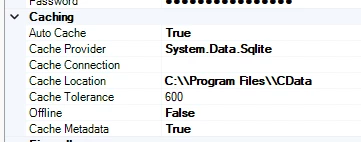


When Auto Cache was False, it was working. I enabled it as true to improve the refresh speed in Power BI service. 

I also cleared cache in Power BI before running the refresh. How can I solve this? I’m using the latest version of CData

2 replies

Forum|alt.badge.img+1
  • Employee
  • October 8, 2026

Hello KaziMahmud,

Thankyou for the details. We have tried the same previously CacheMetadata=True/AutoCache=True setup against a SuiteCRM connection in Power BI Desktop and could see the catalog/tables without issue, so this isn't a universal problem with that configuration.

A couple of things to check on your end:

  • Does C:\Program Files\CData have write access for the account Power BI is running as? That folder can be permission-restricted.
  • Try deleting the existing cache file and reconnecting fresh a partially-written cache from an earlier failed refresh can cause this.

If it still fails, please reach out to [email protected] for further troubleshoot the issue in depth.


Forum|alt.badge.img
  • Author
  • Apprentice
  • October 8, 2026

Hi ​@AnkitK ,


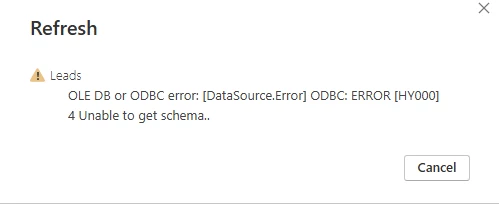
Thanks for the suggestion. I tried refreshing on of the tables after removing the existing cache file. And the following error shows:


OLE DB or ODBC error: [DataSource.Error] ODBC: ERROR [HY000] 4 Unable to get schema.