
When trying to run an update with my CData SSIS Destination components, the job is failing with the following error: “The primary key must be specified to update a row”. What should I do to workaround this problem?

Solved
"The primary key must be specified to update a row" error - SSIS Destination components
Best answer by Rodrigo de Albuquerque
This error likely means the destination table you are trying to update doesn’t have a primary key, which is making the job fail.
In order to fix this issue, you will have to do two things:
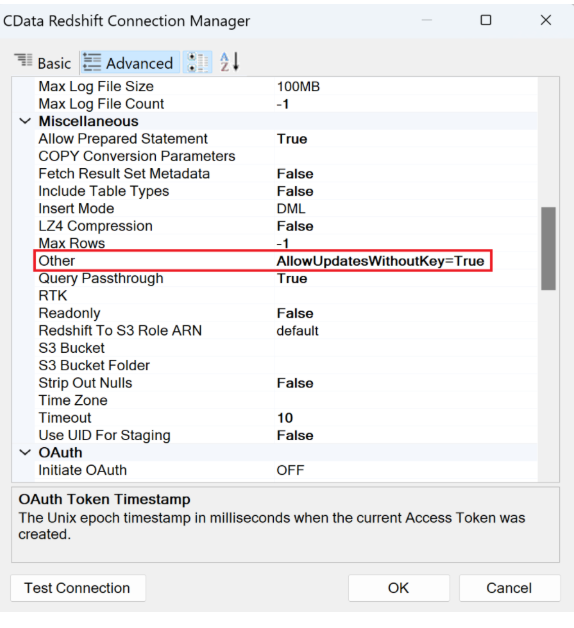
1. Go to your connection manager and AllowUpdatesWithoutKey=True in the Other connection property.
2. Then, go to your destination component “Properties” and for “Filter Columns”, please specify the column the component should use in the WHERE clause for running the updates. On the example below, I want to update based on the “acct_id” field of my table:
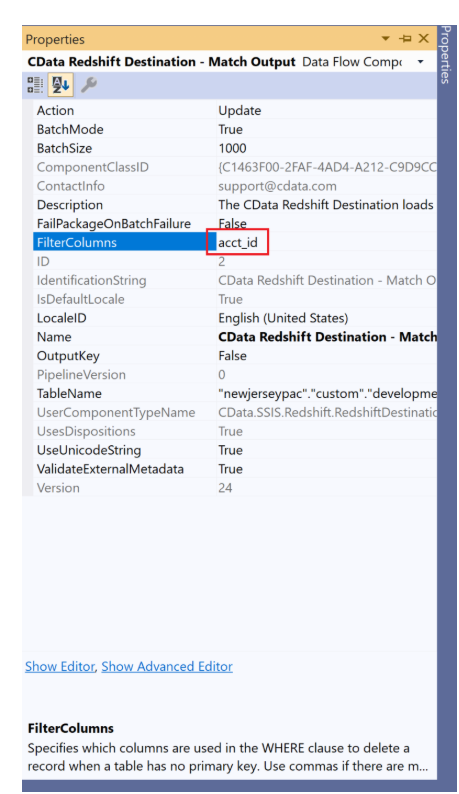
After doing this, the job should run successfully.
This topic has been closed for replies.

Enter your E-mail address. We'll send you an e-mail with instructions to reset your password.