Solved

Environment Variable Not Resolving for ReplicateStartDate

  • June 22, 2026
  • 1 reply
  • 33 views

Forum|alt.badge.img

We upgraded to the latest version of the CDATA last weekend. After that tasks that use environment variables for the ReplicateStartDate property are currently failing.


Current Configuration


Pre job event

<api:set attr="out.env:currenttimestampminus36months"  value="[null | now() | dateadd('month', '-36', 'yyyy-MM-dd')]" />
<api:push item="out" />


Query:


REPLICATE [CTL].[AccountHistory] WITH ReplicateStartDate = '{env:currenttimestampminus36months}', ReplicateInterval = '1', ReplicateIntervalUnit = 'Months', DeletionBehavior = 'SkipDelete', DropTable = 'false' SELECT * FROM [AccountHistory]


Error:

[0] '{env:currenttimestampminus36months}' is not a valid value for the ReplicateStartDate property. We expect a date (yyyy-MM-dd) or an int.


Attempted Fix


Pre job event :

<api:set attr="out.env:currenttimestampminus36monthsModified"  value="[null | now() | todate('yyyy-MM-dd', dateadd('month', '-36', 'yyyy-MM-dd'))]" />

<api:push item="out" />


Query:


REPLICATE [CTL].[AccountHistory] WITH ReplicateStartDate = '{env: currenttimestampminus36monthsModified }', ReplicateInterval = '1', ReplicateIntervalUnit = 'Months', DeletionBehavior = 'SkipDelete', DropTable = 'false' SELECT * FROM [AccountHistory]


Error:

[0] '{env:currenttimestampminus36months}' is not a valid value for the ReplicateStartDate property. We expect a date (yyyy-MM-dd) or an int.


Additional testing

We also attempted to filter the data directly in the query:

Queries :


REPLICATE [CTL].[AccountHistory] SELECT * FROM [AccountHistory] where Createddate >= '{env: currenttimestampminus36monthsModified }'

REPLICATE [CTL].[AccountHistory] SELECT * FROM [AccountHistory] where Createddate >= '2026-01-01'


Error :

[0] The column [CreatedDate] is not allowed in the WHERE clause of a replication


Questions

  1. Is ReplicateStartDate expected to support environment variable substitution?
  2. If so, what is the correct syntax for passing a dynamically generated date from a Pre-Job Event?
  3. Is there an alternative method to dynamically set the replication start date (e.g., using script variables or job parameters)?

Since CreatedDate cannot be used in the replication WHERE clause, what is the recommended approach for performing an initial load limited to the last 36 months?
Best answer by Luçjano Capo

Hi ​@SrilathaSeshadri,

Thank you for reaching out.

The error is occurring due to spaces within your query. Looking closely at the statement below:

REPLICATE [CTL].[AccountHistory] WITH ReplicateStartDate = '{env: currenttimestampminus36monthsModified }', ReplicateInterval = '1', ReplicateIntervalUnit = 'Months', DeletionBehavior = 'SkipDelete', DropTable = 'false' SELECT * FROM [AccountHistory]

The environment variable is written as: 

{env: currenttimestampminus36monthsModified }

Here, there is a space after the semicolon and an additional trailing space. Because of this, the variable is not being parsed correctly, which results in the error you are facing.

The corrected format:

{env:currenttimestampminus36monthsModified}

Additionally, to obtain the current timestamp minus 36 months as mentioned, the todate() function is not required. The current implementation will get you the current date instead. Kindly write the environment variable as:

<api:set attr="out.env:currenttimestampminus36monthsModified"  value="[null | now() | dateadd('month', '-36', 'yyyy-MM-dd')]" />

Regarding your questions:

  1. Yes, environment variables are supported
  2. In your case, the issue is specifically caused by the formatting (extra spaces). This has also been validated in my tests using Sync 26.2.9663. You can refer to the documentation for more details: Using Environment Variables in the REPLICATE Query
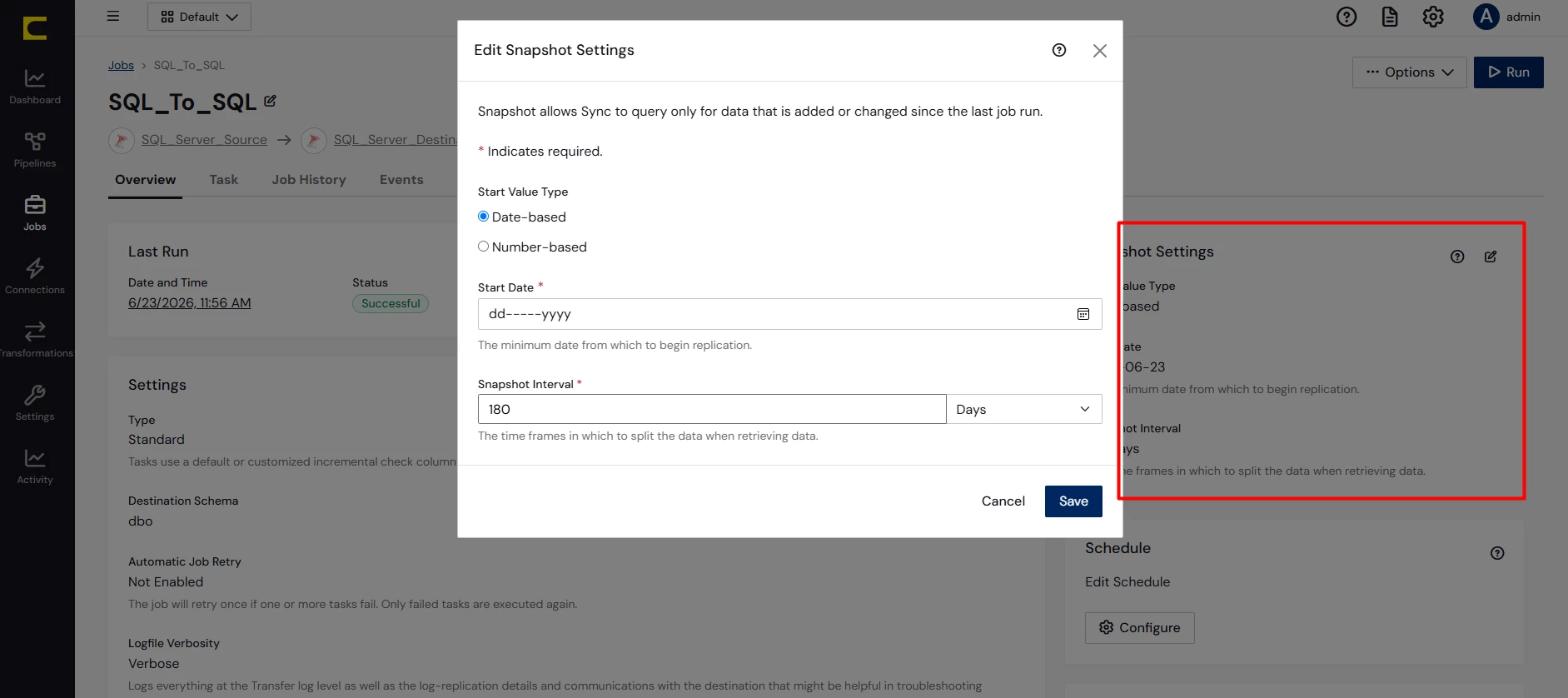
  3. Alternatively, instead of manually modifying the query, you can configure it through Snapshot Settings, without using environment variables if you do not find any use for them.

Navigate to your Job, and under the Overview section locate Snapshot Settings, where you can define the Start Value Type (Date or Number), the Start Date/Number, and the Snapshot Interval:

Regarding the issue with the CreatedDate column, additional details about your setup will be required (source, destination, job type, and configuration) in order to investigate further.

Nevertheless, if this issue continues, please raise a ticket with [email protected] so the support team can assist you directly.

1 reply

Luçjano Capo
Forum|alt.badge.img
  • Employee
  • Answer
  • June 23, 2026

Hi ​@SrilathaSeshadri,

Thank you for reaching out.

The error is occurring due to spaces within your query. Looking closely at the statement below:

REPLICATE [CTL].[AccountHistory] WITH ReplicateStartDate = '{env: currenttimestampminus36monthsModified }', ReplicateInterval = '1', ReplicateIntervalUnit = 'Months', DeletionBehavior = 'SkipDelete', DropTable = 'false' SELECT * FROM [AccountHistory]

The environment variable is written as: 

{env: currenttimestampminus36monthsModified }

Here, there is a space after the semicolon and an additional trailing space. Because of this, the variable is not being parsed correctly, which results in the error you are facing.

The corrected format:

{env:currenttimestampminus36monthsModified}

Additionally, to obtain the current timestamp minus 36 months as mentioned, the todate() function is not required. The current implementation will get you the current date instead. Kindly write the environment variable as:

<api:set attr="out.env:currenttimestampminus36monthsModified"  value="[null | now() | dateadd('month', '-36', 'yyyy-MM-dd')]" />

Regarding your questions:

  1. Yes, environment variables are supported
  2. In your case, the issue is specifically caused by the formatting (extra spaces). This has also been validated in my tests using Sync 26.2.9663. You can refer to the documentation for more details: Using Environment Variables in the REPLICATE Query
  3. Alternatively, instead of manually modifying the query, you can configure it through Snapshot Settings, without using environment variables if you do not find any use for them.

Navigate to your Job, and under the Overview section locate Snapshot Settings, where you can define the Start Value Type (Date or Number), the Start Date/Number, and the Snapshot Interval:

Regarding the issue with the CreatedDate column, additional details about your setup will be required (source, destination, job type, and configuration) in order to investigate further.

Nevertheless, if this issue continues, please raise a ticket with [email protected] so the support team can assist you directly.