
We’re currently testing the S3 destination for various sources using CSV file format and would like to be able to do 2 things:
- Specify a subfolder per job or task
- Append the table name to the destination file
for example, if the S3 Connection is setup to a folder cdata/ i would like to be able to output the following structure
- cdata/
- salesforce/
- account/
- account_20260722113426039_1.csv
- account_20260722113426039_2.csv
- contact/
- contact_20260722113426039_1.csv
- account/
- servicenow/
- task/
- task_20260722113426039_1.csv
- task/
- salesforce/
..etc
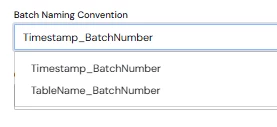
The closest I’ve been able to get is appending something to the table/folder name, and I can’t find any usable option to control the file name format. I’ve tried changing the batch naming convention in the connection settings but it had no affect.
- cdata
- salesforce_account
- 20260722113426039_1.csv
- 20260722113426039_2.csv
- salesforce_account
..etc
Additionally - Ther’es no documentation on the “Advanced” features of the S3 destination other than “you probably won’t need it” -- not a good look.
Sync version 26.2.9669.0, S3 driver version 25.0.9539.0