

Solved

Need an example to createworkbook in Delphi

  • April 28, 2023
  • 3 replies
  • 389 views

Forum|alt.badge.img

Greetings,

I’m using Delphi, and I have installed this CData components

  • CData FireDAC Components for Microsoft Excel
  • CData FireDAC Components for Excel

Background:

I’m executing a stored procedure (SP) in sql server that will return the result of two queries; (this SP can be updated and columns could be renamed, added or even deleted later).

Currently, I manually copy the results of each query into a new Excel file each time I am asked for such information.

And I want to automate this: Using these two results and from a VCL application in Delphi, I want to store them in an xlsx file on two sheets each.


Support directed me to this url: https://cdn.cdata.com/help/RXH/fire/pg_sp-createworksheet.htm
But I can't find a correct example to use it in Delphi.

I am still waiting for a follow up answer, then I discovered this new community and hope to get help here.


This is what I have currently tried.

In a Delphi project: with this components:
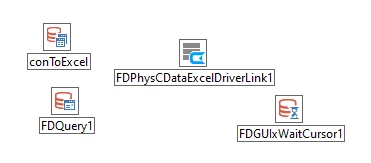
The driver that I can use is “CDataExcel”; the one shown on the page https://www.cdata.com/drivers/excel/firedac/ does not work for me.

FDConnection1.Name := 'ExcelConnection';
FDConnection1.DriverName := 'CData.Fire.Excel';
 
This is the code that I can think of to try. At the moment I am just trying to create the xlsx file, without success.
 
Lacking a pascal/Delphi formatter, I am using Java.
unit Unit1;

interface

uses
Winapi.Windows, Winapi.Messages, System.SysUtils, System.Variants, System.Classes, Vcl.Graphics,
Vcl.Controls, Vcl.Forms, Vcl.Dialogs, FireDAC.Stan.Intf, FireDAC.Stan.Option, FireDAC.Stan.Error, FireDAC.UI.Intf,
FireDAC.Phys.Intf, FireDAC.Stan.Def, FireDAC.Stan.Pool, FireDAC.Stan.Async, FireDAC.Phys, FireDAC.Stan.Param,
FireDAC.DatS, FireDAC.DApt.Intf, FireDAC.DApt, FireDAC.Phys.CDataExcelDef, FireDAC.VCLUI.Wait, FireDAC.Comp.UI,
FireDAC.Phys.CDataExcel, Data.DB, FireDAC.Comp.DataSet, FireDAC.Comp.Client, Vcl.StdCtrls;

type
TForm1 = class(TForm)
Button1: TButton;
mmoLog: TMemo;
conToExcel: TFDConnection;
FDQuery1: TFDQuery;
FDPhysCDataExcelDriverLink1: TFDPhysCDataExcelDriverLink;
FDGUIxWaitCursor1: TFDGUIxWaitCursor;
procedure Button1Click(Sender: TObject);
private
{ Private declarations }
procedure LogTo(msg: string);
public
{ Public declarations }
end;

var
Form1: TForm1;

implementation
uses ShlObj;

{$R *.dfm}

procedure TForm1.LogTo(msg: string);
begin
mmoLog.Lines.Add(msg);
end;

procedure TForm1.Button1Click(Sender: TObject);
var
desktopfolder, sNewFile: string;
RowsAffected : integer;
begin
//sNewFile:= 'file://E:\CData\New1.xlsx';
sNewFile:= 'E:/CData/New1.xlsx';
// Test #1. Got error:
// [FireDAC][Phys]-300. Driver [CData.Fire.Excel] is not registered.
// Correct driver ID or define [CDATA.FIRE.EXCEL] virtual driver in FDDrivers.ini
try
conToExcel.DriverName := 'CData.Fire.Excel';
//conToExcel.Params.Values['URI'] := 'E:\CData\Existing.xlsx'; // THIS EXISTS
conToExcel.Params.Values['URI'] := 'E:/CData/Existing.xlsx'; // THIS EXISTS
conToExcel.Connected := True;
LogTo('#1 Connected to: '+conToExcel.Params.Values['URI']);
except
on E: Exception do
begin LogTo('#1'); LogTo(E.Message); end;
end;

// Test #2. No errors here
try
conToExcel.DriverName := 'CDataExcel';
//conToExcel.Params.Values['URI'] := 'E:\CData\Existing.xlsx'; // THIS EXISTS
conToExcel.Params.Values['URI'] := 'E:/CData/Existing.xlsx'; // THIS EXISTS
conToExcel.Connected := True;
LogTo('#2 Connected to: '+conToExcel.Params.Values['URI']);
except
on E: Exception do
begin LogTo('#2'); LogTo(E.Message); end;
end;

// Test #3. Got error:
// [FireDAC][Phys][CData]Malformed SQL Statement: Unexpected token encountered: [CreateWorksheet].
// Statement:CreateWorksheet 'E:/CData/New1.xlsx'
try
RowsAffected := conToExcel.ExecSQL('CreateWorksheet '+ QuotedStr(sNewFile) );
LogTo(format('#3 %d, created',[RowsAffected]));
except
on E: Exception do
begin LogTo('#3'); LogTo(E.Message); end;
end;

// Test #4. Got error:
// [FireDAC][Phys][CData]Malformed SQL Statement: Unexpected token encountered: [CreateWorksheet].
// Statement:CreateWorksheet 'E:\CData\New1.xlsx'
try
RowsAffected := conToExcel.ExecSQL('CreateWorksheet '+ QuotedStr(sNewFile) );
LogTo(format('#4 %d, created',[RowsAffected]));
except
on E: Exception do
begin LogTo('#4'); LogTo(E.Message); end;
end;

// Test #5.1
//[FireDAC][Phys][CData]Malformed SQL Statement: Unexpected token encountered: [CreateWorksheet].
//Statement:CreateWorksheet ?
try
FDQuery1.SQL.Text := 'CreateWorksheet :File';
FDQuery1.Params[0].AsString := QuotedStr(sNewFile);
FDQuery1.ExecSQL; LogTo('#5.1 created');
except
on E: Exception do
begin LogTo('#5.1'); LogTo(E.Message); end;
end;

// Test #5.2
//[FireDAC][Phys][CData]Malformed SQL Statement: Unexpected token encountered: [CreateWorksheet].
//Statement:CreateWorksheet (?)
try
FDQuery1.SQL.Text := 'CreateWorksheet (:File)';
FDQuery1.Params[0].AsString := QuotedStr(sNewFile);
//FDQuery1.Params[0].AsString := sNewFile;
FDQuery1.ExecSQL; LogTo('#5.2 created');
except
on E: Exception do
begin LogTo('#5.2'); LogTo(E.Message); end;
end;

// Test #5.3
//[FireDAC][Phys][CData]Malformed SQL Statement: Unexpected token encountered: [?].
//Statement:exec CreateWorksheet (?)
try
FDQuery1.SQL.Text := 'exec CreateWorksheet (:File)';
FDQuery1.Params[0].AsString := QuotedStr(sNewFile);
FDQuery1.ExecSQL; LogTo('#5.3 created');
except
on E: Exception do
begin LogTo('#5.3'); LogTo(E.Message); end;
end;

// Test #5.4
//(exec CreateWorksheet '..') [FireDAC][Phys][CData]Object reference not set to an instance of an object.
try
FDQuery1.SQL.Text := 'CreateWorksheet '+QuotedStr(sNewFile);
FDQuery1.ExecSQL; LogTo('#5.4 created');
except
on E: Exception do
begin LogTo('#5.4'); LogTo(E.Message); end;
end;

// Test #5.5
//[FireDAC][Phys][CData]Malformed SQL Statement: Unexpected token encountered: [CreateWorksheet].
//Statement:CreateWorksheet 'E:/CData/New1.xlsx'
try
FDQuery1.SQL.Text := 'CreateWorksheet '+QuotedStr(sNewFile);
FDQuery1.ExecSQL; LogTo('#5.5 created');
except
on E: Exception do
begin LogTo('#5.5'); LogTo(E.Message); end;
end;

// Test #5.6
//[FireDAC][Phys][CData]Malformed SQL Statement: Unexpected token encountered: [CreateWorksheet].
//Statement:CreateWorksheet E:/CData/New1.xlsx
try
FDQuery1.SQL.Text := 'CreateWorksheet '+sNewFile;
FDQuery1.ExecSQL; LogTo('#5.6 created');
except
on E: Exception do
begin LogTo('#5.6'); LogTo(E.Message); end;
end;


end;

end.

Thank you in advance for the help.

Best answer by DSistemas

I can think of a trick:

  • In Delphi create an empty "file.xlsx" file (in some existing, temporary location, the name can be random).
  • Assign it to the URI so that it "connects".
  • Create the xlsx file, its tables and work on it.
  • Point the URI to this new file
  • Delete that created file at startup.

I do not know if there is an alternative that I have not found in the documentation, but if it does not exist it would be a good feature in CData.


I have verified that it works.


This is my final code, of course only for testing purposes.

  try
conToExcel.DriverName := 'CDataExcel';
// For CData
sNewFile2:= 'E:/CData/New3.xlsx';
sDummyFile := 'E:\CData\empty.xlsx';

//'E:\CData\New3.xlsx';
if FileExists(sNewFile2) then
begin
DeleteFile(sNewFile2);
sleep(2000); // just to see the file disappear.
end;

// THIS FILE EXISTS, but is an empty dummy file, manually created for now
conToExcel.Params.Values['URI'] := sDummyFile;
conToExcel.ExecSQL
(format('EXEC CreateWorksheet file = %s, sheet = %s, Columnnames = %s',
[QuotedStr(sNewFile2), QuotedStr('MyNewWorksheet')
, QuotedStr('Name,Age,Status')
]));
LogTo('#a) MyNewWorksheet');

conToExcel.ExecSQL
(format('EXEC CreateWorksheet file = %s, sheet = %s, Columnnames = %s',
[QuotedStr(sNewFile2), QuotedStr('Detail')
, QuotedStr('col1,col2,col3,col4')
]));
LogTo('#a) Detail');

conToExcel.ExecSQL
(format('EXEC CreateWorksheet file = %s, sheet = %s, Columnnames = %s',
[QuotedStr(sNewFile2), QuotedStr('Report3')
, QuotedStr('uuid,folio,date,amount')
]));
LogTo('#a) Detail');

LogTo('#a) URI exists, points to an empty file: '+conToExcel.Params.Values['URI']);

// try to open new file
conToExcel.Params.Values['URI'] := 'file://'+sNewFile2;
conToExcel.Connected := True;
LogTo('');
LogTo('#b) Connected to: '+conToExcel.Params.Values['URI']);

FDQuery1.Connection.Params.Values['Header'] := 'false';
RowsAffected := FDQuery1.ExecSQL('insert into Sheet2 (A) values (:LastName)', ['Mr.E']);
LogTo('');
LogTo(format('INSERTED (Sheet2): %d',[RowsAffected]));

FDQuery1.Connection.Params.Values['Header'] := 'true';
RowsAffected := FDQuery1.ExecSQL('insert into MyNewWorksheet (Name,Age,Status) values (:LastName,:Age,:Status)',
['Mr.E',54,'Alive!']); // works!
LogTo('');
LogTo(format('INSERTED (MyNewWorksheet): %d',[RowsAffected]));

// This is not working ... why?
FDQuery1.Connection.Params.Values['Header'] := 'true';
RowsAffected := FDQuery1.ExecSQL('insert into Report3 (uuid,folio,date,amount) values (:uuid,:folio,:date,:amount)'
, ['feaa3f97-269a-491f-ae3a-86ff85149e03','F123456789','2023-04-29',123.45]); // works!
LogTo('');
LogTo(format('INSERTED (Report3): %d',[RowsAffected]));

// if FileExists(sDummyFile) then DeleteFile(sDummyFile);

except
on E: Exception do
begin LogTo('Error'); LogTo(E.Message); end;
end;

This looks great, now that I understand more about this component.

New questions have arisen, but those are for later.

Regards

This topic has been closed for replies.

3 replies

  • April 28, 2023

Hello! Thanks for joining and contributing to the CData Community! We’re glad to have you here.

I looked into this and found the ticket you already have open with our support team. I also noticed that an agent had followed up with you via email regarding this issue as well. For future reference, specific technical questions of this nature are best handled by our dedicated support team Please direct any follow-up questions you may have to the agent already handling your issue, as they are best equipped to aid in resolving inquiries like these.


Forum|alt.badge.img
  • Author
  • Apprentice
  • April 28, 2023

Thanks for the answer.

Indeed support has answered me.

Since to date it is difficult to find examples in Delphi to use CData/FireDAC.
I will post part of the code that worked for me, as part of the solution, maybe someone else will find it useful in the future.

If this is not a problem of course.

var
sNewFile : string;
begin
sNewFile:= 'E:/CData/New1.xlsx';

// Test #1.a) if the URI file exists it works!
try
conToExcel.DriverName := 'CDataExcel';
conToExcel.Params.Values['URI'] := 'E:\CData\Existing.xlsx'; // THIS EXISTS
LogTo('#1.a) File exists: '+conToExcel.Params.Values['URI']);
except
on E: Exception do
begin LogTo('#1.a) Error'); LogTo(E.Message); end;
end;

// Test #1.b) if the URI points to existing file it works
try
FDQuery1.SQL.Text := 'EXEC CreateWorksheet file = :file, sheet = :sheet';
FDQuery1.Params[0].AsString := sNewFile;
FDQuery1.Params[1].AsString := 'MyNewWorksheet';
FDQuery1.Open;
FDQuery1.Close;

LogTo('#1.b) TestWorksheet created');
Logto('URI= '+conToExcel.Params.Values['URI']);
except
on E: Exception do
begin LogTo('1.b) Error. TestWorksheet'); LogTo(E.Message); end;
end;

// RESULTS:
//#1.a) File exists: E:\CData\Existing.xlsx
//#1.b) TestWorksheet created
//URI is not empty: E:\CData\Existing.xlsx
end;

The previous code works, but only if the URI points to an existing file.

Now, how to make it work if there is no file specified in the URI?

I tried this but with errors:

  // #5
try
conToExcel.DriverName := 'CDataExcel';
conToExcel.Params.Values['URI'] := '';
conToExcel.ExecSQL(format('EXEC CreateWorksheet file = %s, sheet = %s,',[QuotedStr('E:/CData/NewNoURI2.xlsx'), QuotedStr('MyNewWorksheet')]));
LogTo('#5) URI empty: '+conToExcel.Params.Values['URI']);
except
on E: Exception do
begin LogTo('#5) URI Empty. Error'); LogTo(E.Message); end;
end;

// Result
// #5) URI Empty. Error
// [FireDAC][Phys][CData]Test connection failed: You must specify an Excel file: Set the URI property to an .xlsx file.


Thank you to Ms. E. Gonzalez from support for the help 👍🏼


Forum|alt.badge.img
  • Author
  • Apprentice
  • Answer
  • April 29, 2023

I can think of a trick:

  • In Delphi create an empty "file.xlsx" file (in some existing, temporary location, the name can be random).
  • Assign it to the URI so that it "connects".
  • Create the xlsx file, its tables and work on it.
  • Point the URI to this new file
  • Delete that created file at startup.

I do not know if there is an alternative that I have not found in the documentation, but if it does not exist it would be a good feature in CData.


I have verified that it works.


This is my final code, of course only for testing purposes.

  try
conToExcel.DriverName := 'CDataExcel';
// For CData
sNewFile2:= 'E:/CData/New3.xlsx';
sDummyFile := 'E:\CData\empty.xlsx';

//'E:\CData\New3.xlsx';
if FileExists(sNewFile2) then
begin
DeleteFile(sNewFile2);
sleep(2000); // just to see the file disappear.
end;

// THIS FILE EXISTS, but is an empty dummy file, manually created for now
conToExcel.Params.Values['URI'] := sDummyFile;
conToExcel.ExecSQL
(format('EXEC CreateWorksheet file = %s, sheet = %s, Columnnames = %s',
[QuotedStr(sNewFile2), QuotedStr('MyNewWorksheet')
, QuotedStr('Name,Age,Status')
]));
LogTo('#a) MyNewWorksheet');

conToExcel.ExecSQL
(format('EXEC CreateWorksheet file = %s, sheet = %s, Columnnames = %s',
[QuotedStr(sNewFile2), QuotedStr('Detail')
, QuotedStr('col1,col2,col3,col4')
]));
LogTo('#a) Detail');

conToExcel.ExecSQL
(format('EXEC CreateWorksheet file = %s, sheet = %s, Columnnames = %s',
[QuotedStr(sNewFile2), QuotedStr('Report3')
, QuotedStr('uuid,folio,date,amount')
]));
LogTo('#a) Detail');

LogTo('#a) URI exists, points to an empty file: '+conToExcel.Params.Values['URI']);

// try to open new file
conToExcel.Params.Values['URI'] := 'file://'+sNewFile2;
conToExcel.Connected := True;
LogTo('');
LogTo('#b) Connected to: '+conToExcel.Params.Values['URI']);

FDQuery1.Connection.Params.Values['Header'] := 'false';
RowsAffected := FDQuery1.ExecSQL('insert into Sheet2 (A) values (:LastName)', ['Mr.E']);
LogTo('');
LogTo(format('INSERTED (Sheet2): %d',[RowsAffected]));

FDQuery1.Connection.Params.Values['Header'] := 'true';
RowsAffected := FDQuery1.ExecSQL('insert into MyNewWorksheet (Name,Age,Status) values (:LastName,:Age,:Status)',
['Mr.E',54,'Alive!']); // works!
LogTo('');
LogTo(format('INSERTED (MyNewWorksheet): %d',[RowsAffected]));

// This is not working ... why?
FDQuery1.Connection.Params.Values['Header'] := 'true';
RowsAffected := FDQuery1.ExecSQL('insert into Report3 (uuid,folio,date,amount) values (:uuid,:folio,:date,:amount)'
, ['feaa3f97-269a-491f-ae3a-86ff85149e03','F123456789','2023-04-29',123.45]); // works!
LogTo('');
LogTo(format('INSERTED (Report3): %d',[RowsAffected]));

// if FileExists(sDummyFile) then DeleteFile(sDummyFile);

except
on E: Exception do
begin LogTo('Error'); LogTo(E.Message); end;
end;

This looks great, now that I understand more about this component.

New questions have arisen, but those are for later.

Regards
