


I am attempting a new connection to an external data source in CData Arc. When I complete the authorization against the source, the connection fails with an error “No Error Code Provided”:
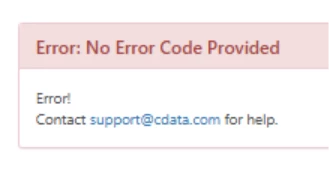
There do not appear to be any additional logs that offer more insight into this error. This issue is specific to the Windows (.NET) Edition of CData Arc.
Explanation:
OAuth connections to external data sources in CData Arc work by authorizing access via the external data source and having the results of that authorization posted to a special endpoint in the application that processes these callback requests: /src/oauthCallback.rst
This error can occur when CData Arc is unable to process the callback request. The most common reason that this error occurs is that the query string for the callback request is longer than the default web server embedded with CData Arc allows for (2048 bytes).
Resolution:
Option 1 – configure the webserver to allow for longer query strings:
This maximum query string length can easily be reconfigured to allow for longer requests. To make this change, locate the web.config for CData Arc in the \www\web.config file in Arc's installation path and edit it in a text editor to explicitly set a longer maxQueryStringLength. Look for the httpRuntime element (usually line 19):
<httpRuntime maxRequestLength="2097151" executionTimeout="21600" requestValidationMode="2.0" enableVersionHeader="false" />
And add a new maxQueryStringLength attribute:
<httpRuntime maxQueryStringLength="8192" maxRequestLength="2097151" executionTimeout="21600" requestValidationMode="2.0" enableVersionHeader="false" />
NOTE: Changes to the web.config will trigger a restart of the embedded webserver. While this change will take place quickly, if you wish to avoid an interruption in processing, you can schedule a maintenance window to apply this change.
Later releases of CData Arc will include the larger configured maxQueryStringLength by default.
Option 2 – use an alternative authentication mechanism (if available):
Some connector types that support OAuth also support multiple authentication options (for example, the Salesforce connector). If this is the case, these additional authentication mechanisms appear under the Auth Scheme drop down in the connection configuration menu. Auth schemes like AzureServicePrincipalCert and AzureMSI do not use a callback URL and will avoid this issue. This option is not available for all connector types.
