

When using our SSIS Components in Visual Studio 2019 you may run into an issue when attempting to open the ‘Mappings’ tab in the Destination Editor window that causes the window to crash or Visual Studio to crash.
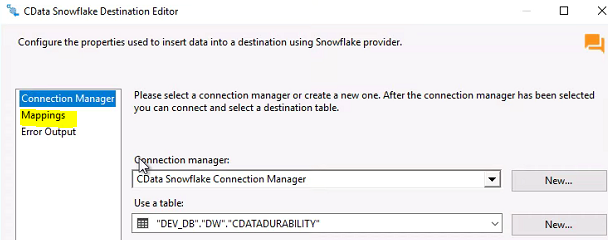
This is caused by Visual Studio 2019 referencing our CData.SSIS2022.Design.DLL instead of CData.SSIS2019.Design.DLL when the TargetServerVersion project property is set to SQL Server 2022. The versions of the dependent DLLs (Microsoft.SqlServer.GridControl.DLL/Microsoft.SqlServer.DlgGrid.DLL) are incompatible. We can resolve this issue by modifying the devenv.exe.config file to specify the version of the DLL that VS2019 should use.
To modify the devenv.exe.config file you will first need to open the file in a text editor or Visual Studio. The file should be at one of these file locations:
C:\Program Files(x86)\Microsoft Visual Studio\2019\Community\Common7\IDE\devenv.exe.config
C:\Program Files\Microsoft Visual Studio\2019\Community\Common7\IDE\devenv.exe.config
After opening the file, please add the following modification to the list of Dependent Assembly items:
<dependentAssembly>
<assemblyIdentity name="Microsoft.SqlServer.DlgGrid" publicKeyToken="89845dcd8080cc91" culture="neutral"/>
<bindingRedirect oldVersion="11.0.0.0-16.200.0.0" newVersion="15.0.0.0"/>
</dependentAssembly>
<dependentAssembly>
<assemblyIdentity name="Microsoft.SqlServer.GridControl" publicKeyToken="89845dcd8080cc91" culture="neutral"/>
<bindingRedirect oldVersion="11.0.0.0-16.200.0.0" newVersion="15.0.0.0"/>
</dependentAssembly>
After adding this modification, please save the devenv.exe.config file and restart Visual Studio. After this you should be all set and no longer running into the issue with the ‘Mappings’ tab in the Destination Editor.
