

When performing memory-intensive queries like joining two tables that contain a large number of rows, it sometimes exceeds the heap memory allocated by the tool configuration settings, resulting in an Out of Memory error.
To resolve such issue, you can perform the following configuration steps on each tool respectively:
In DBeaver, to increase the allocated heap memory by 2GB, proceed into adding the following setting in dbeaver.ini file (typically stored on a similar path: C:\Users\User\AppData\Local\DBeaver).

In DBVisualizer you can update such settings via the Tools Properties window. In the below example we are setting the maximum allocated heap memory to 4GB.
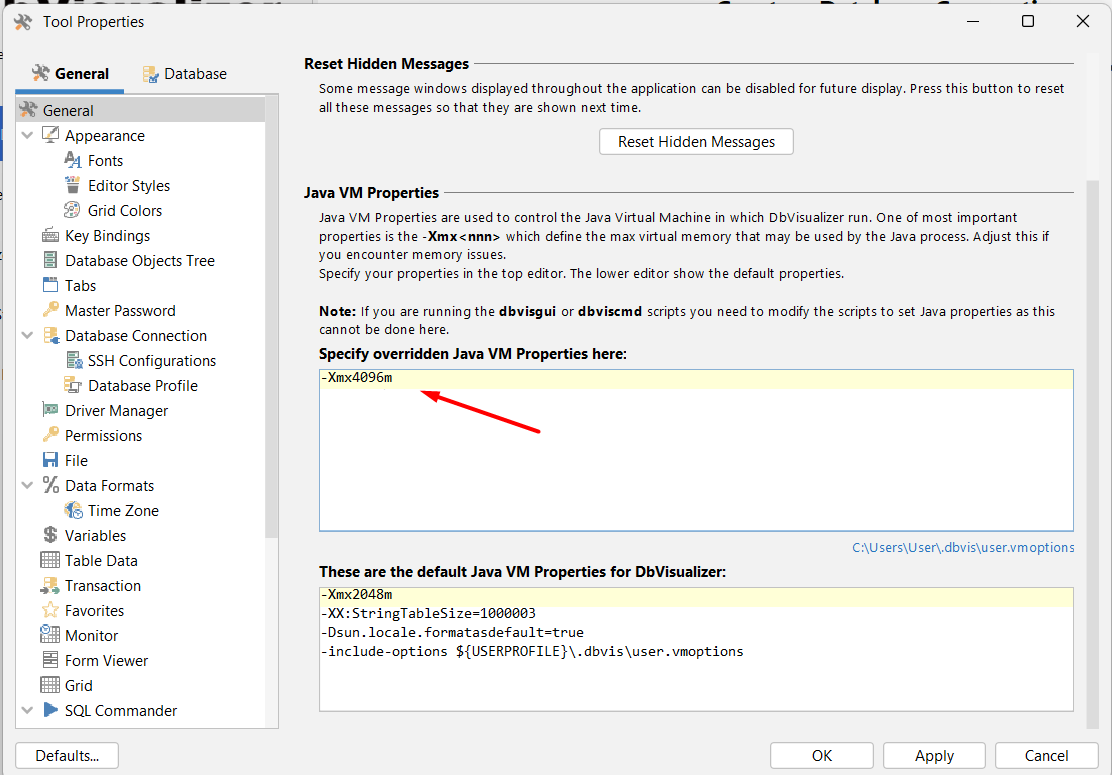
After performing the above configuration, you should be able to execute the query successfully.
Please reach out to [email protected] if the above instructions are not helpful.
